Once the module has been set up by an Administrator, as a functional administrator “HRD”, you can start the distribution of BPE.
Create the collaborator areas
Start by classifying with Open Bee™ ERP Manager at least one BPE for each of the employees concerned by the BPE. They are classified in subfolders of “/HR/Employee Area”.
From the “Administration / Extranet” section, you will be able to view all the employee areas and create the users who will be associated with these folders.
Refer to the Extranet administrator documentation for more details.
Automate the creation of employee spaces
If Open Bee™ ERP Manager is able to retrieve employees’ emails from the BPE or from your HR ERP database, it is possible to automatically create employee spaces thanks to the automatic account creation function of the Extranet.
Refer to the Extranet administrator documentation for more details.
Setting up the Personal Activity Account (CPA)
OBSOLETE: The Caisse des Dépôts has stopped this service.
The Open Bee™ BPE module allows connectivity to the CPA, which reads the BPE in the employees’ spaces.
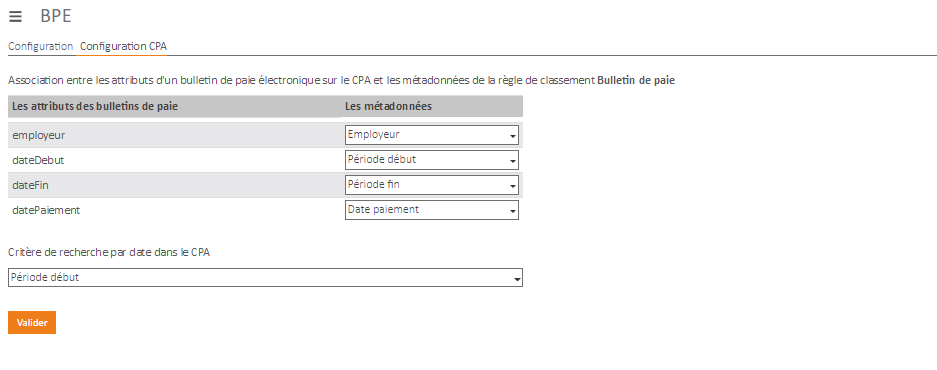
This interconnection is based on an association between the metadata below of the “Payslip” classification rule and the data expected by the CPA:
- Employer
- Beginning period
- End period
- Payment date (optional)
This association allows the CPA to filter and search for the EPGs they display.
If you change or delete any of these metadata, it is important to come and redo this association.
To do this, use the “BPE” menu and then the “CPA Configuration” tab.
Modifying user accounts
The user accounts used for the distribution of BPEs and defined by the administrator during the initial configuration can be modified using the “BPE” menu, then the “Configuration” tab.