Once the module is installed, a new “BPE” item is available in the main menu of Open Bee™ Portal.
 Only members of the “Administrators” group have access to this menu.
The module offers you to choose or create two user accounts necessary for the distribution of BPEs:
- The BPE distribution manager: this user will have the “Functional Administrator” role
- A “system” account that will be used by Open Bee™ ERP Manager to deposit BPE in Open Bee™ Portal.
For the rest, we will refer to these users as “HRD” and “ERP-HR”. Icon
Once defined, these users cannot be modified.
As the “HRD” user is the manager of a Secure Storage Area, he or she must have a valid e-mail address in order to be able to log in.
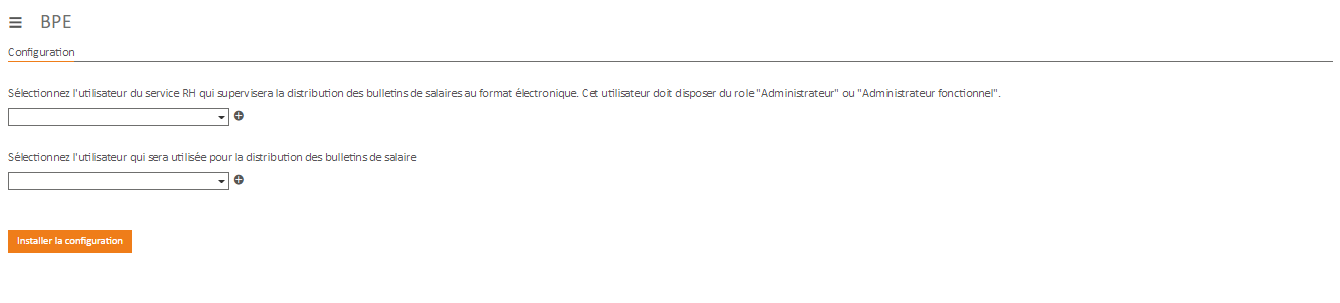
If the users don’t exist yet, you can simply create them using the “+” button.
The validation of this form automatically performs the following operations for you:
- Create users if they don’t exist
- Creation of a Secure Storage Space, named “RH” at the root of the Open Bee™ Portal tree with the HRD user as manager. The ERP-HR user has write permission only on this space.
- Creation of a subfolder of “Employee Area” in the “HR” space with the same permissions.
- A “Payslip” filing rule with the following configuration:
- Permission to edit only by the “HR” user
- Metadata:
- Employer (list)
- Full Name (List)
- Number (list)
- Start period (date)
- End period (date)
- Payment Date (date)
- Email (text)
- Filing of documents in the /HR/Employee Space/
– / folder - Rename documents as follows: BulletinDePaie_
– _
- An extranet with the following configuration:
- The “/HR/Employee Area” folder as the root folder
- Read permissions only for extranet users
- Write permissions only for the “ERP-HR” user
It is quite possible to carry out this configuration “by hand”, without going through the Open Bee™ BPE module.
Once this first step is completed, you can configure Open Bee™ ERP Manager which will allow the automated deposition and deposition control mechanisms of GEPs, and thus classify your first GEPs.
It is then the responsibility of the HR manager (HRD user) to authorise its distribution or not to employees.