Aftercare
The Reminder Tracking interface consists of two sections : Pending Reminders and Processed Reminders
Pending reminders
The Pending Reminder interface allows you to view the list of reminders to be processed, you can choose to mark them as processed or to process them by triggering the creation of a task or injection into a workflow.
Only reminders that have been created with manual processing are displayed in this section. Reminders that are processed automatically will be directly visible in the Processed Reminders section.
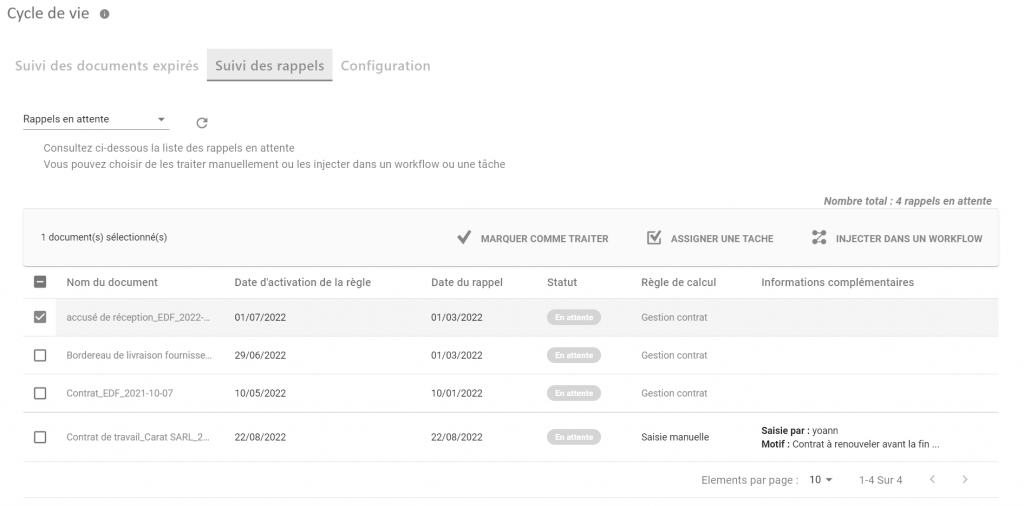
- MARK AS PROCESS : The reminder changes to the “Processed” state. No action is taken in Open Bee™ Portal.
- ASSIGN A TASK: The callback changes to the “Processed” state, but a task is created. This task can be assigned to the user who processed the reminder or to another user or group of users.
- INJECT INTO A WORKFLOW: The reminder changes to the “Processed” state, but the document is injected into an automatic workflow.
Recalls processed
The Processed Reminders interface allows you to view the history of all processed reminders for which the user is the supervisor.
From this screen, it is possible to find out when and how and by whom the recall was processed.
The list can be filtered by date range, by reminder rule, or by user who handled the reminders.
If the reminder has been processed by a workflow or task, it is possible to know their status.
In the example below, three callbacks were processed:
- The first was marked as a treaty
- The second was processed by assigning a task and this task was successfully completed
- The third was processed by triggering a workflow but the workflow is still running
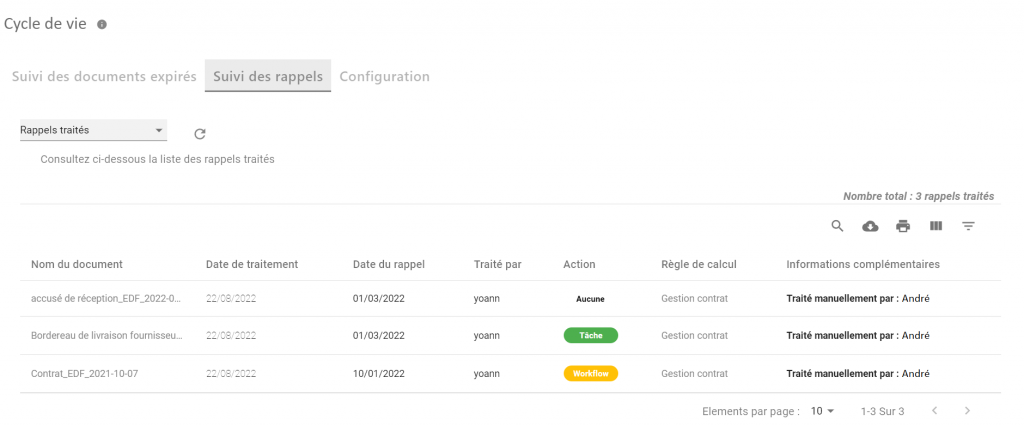
More information on how the reminder is handled by clicking on the Task or Workflow icon.
