Since version 6.13.1 of Open Bee™ Chorus Pro, it is possible to directly process the invoice from a workflow task.
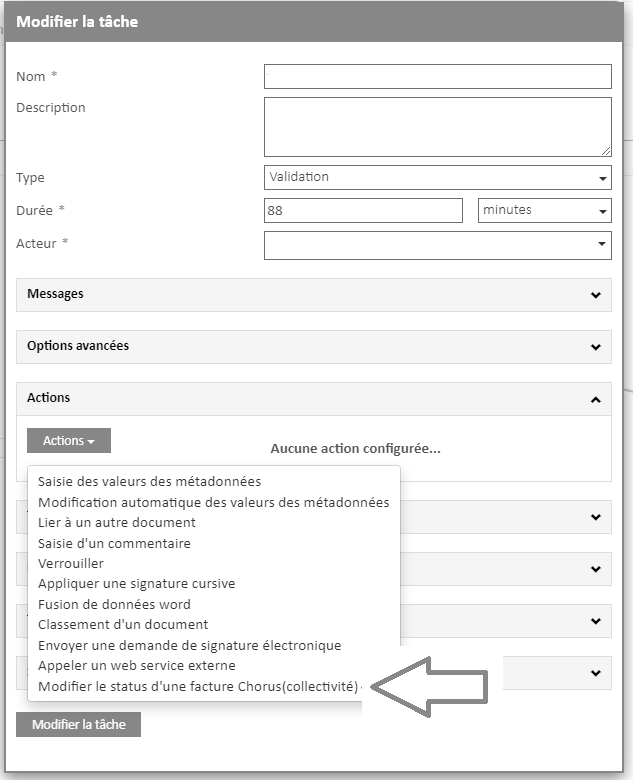
Once the Open Bee™ Chorus Pro module is installed and activated, a new action appears in the list of actions of a workflow task: Change the status of an invoice (collectivity)
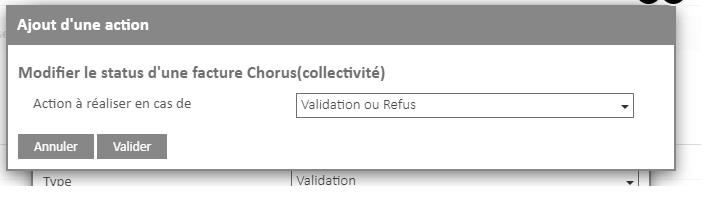
It is possible to choose whether this action should be triggered in case of validation or rejection of the task.
When the action is added to the task, the user will have to change the status of the invoice in order to validate the workflow task.
Only documents associated with Chorus can be processed by this task.
This action is for the use of the recipients only.
Please note : It is not possible to change the status of credit notes related to rejected invoices, so this type of document is not compatible with this action.
Credit notes linked to the rejected invoice automatically have a status of “PRISE_EN_COMPTE_DESTINATAIRE”
You can exclude this document type by adding a filter on the workflow trigger or on the transition creating the task of the type:
Status is different from “PRISE_EN_COMPTE_DESTINATAIRE”