Before updating your solution, it is imperative to make a backup of your current installation.
Open Bee™ declines all responsibility in the event of loss of data during an update that has been carried out without prior backup.
Update 5.2.X to 5.7.X or 5.8.X
Saving the current configuration
Back up the contents of the folder C:Program Files (x86)Microsoft OfficeOfficeManagerConfiguration or C:Program FilesMicrosoft OfficeOfficeManagerConfiguration (depending on your operating system).
Updated
- Uninstall version 5.2.X from the ” Start ” menu -> “Open Bee™” -> ” Uninstall Open Bee™ Doc Office Manager “
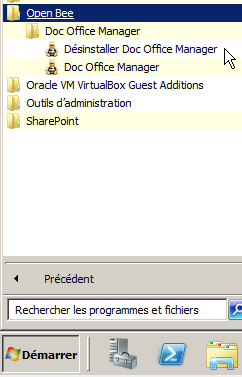
- Then, double-click on the new installer provided and follow the instructions.
- After the installation was complete, Open Bee™ Doc Office Manager was updated.
Test
Please perform a placement test to Open Bee™ Portal to verify that it is working properly.
Upgrade 5.7.X to 5.8.X or 5.7.X/5.8.X to 6.X
Saving the current configuration
Back up the contents of the C:Users%username%folder AppDataRoamingOpenBeeOfficeManagerConfiguration
Updated
Refer to the Open Bee™ Doc Office Manager installation page
Test
Please perform a placement test to Open Bee™ Portal to verify that it is working properly.