Filing a case
This add-in gives the possibility to classify all the documents in a Windows folder. Open the directory context menu with a right-click and click ” File in Open Bee™ Portal “.
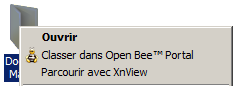
The ” Ranking in Open Bee™ Portal » Appears. Refer to the paragraph: Using the “ Ranking in Open Bee™ Portal » for information about filing processing.
Filing a document
To classify a PDF document, Microsoft Word document, Microsoft Excel sheet, or Microsoft PowerPoint presentation directly from Windows Explorer in Open Bee™ Portal, simply right-click on the document and click ” File in Open Bee™ Portal “.
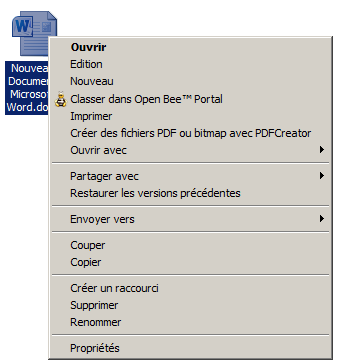
The ” Ranking in Open Bee™ Portal » Appears. Refer to the paragraph: Using the “ Ranking in Open Bee™ Portal ” window for information about filing processing.