This type of import allows you to download documents from an Open Bee™ Portal folder to a Windows folder (local or remote) while maintaining the tree structure.
Limitations :
- If a document is deleted from the Open Bee™ Portal folder after import, it will not be deleted in the Windows folder.
Configuration
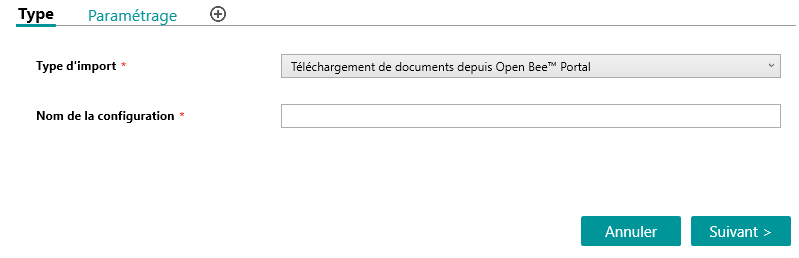
The first step in the setup is to choose the tax type “Upload documents from Open Bee™ Portal” and give the setup a name.
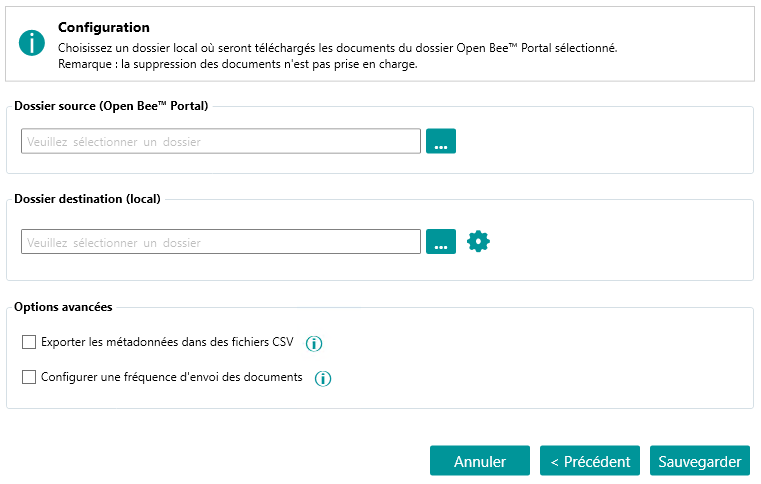
The second step is to define the source folder where the documents to be imported will be retrieved as well as the destination folder where the documents will be downloaded.
All documents and subfolders will be downloaded while keeping the tree structure.
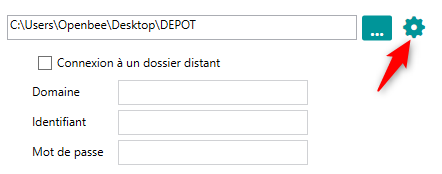
Network Directory
Le dossier destination peut être un répertoire réseau.
Dans ce cas, il faudra configurer les informations de connexion.
Advanced options
– File metadata can be exported to CSV files. A file per filing rule will be generated containing all the documents in that filing rule. These CSV files are created at the root of the destination directory in a folder named “_MetadataCSV”
– It is possible to configure a sending frequency that will automatically import new documents every XX minutes/hours.
Processing Time
As an indication, it takes 30 hours to download 17,000 documents of 900 GB in total (internet connection> 50 Mbps).