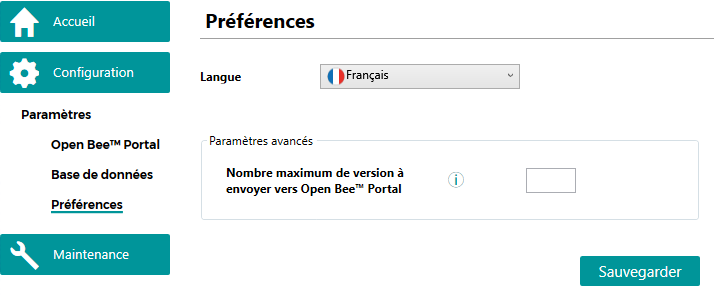
Before you start using Open Bee™ Data Importer, it is necessary to configure the application (Open Bee™ Portal, and Preferences).
These screens can be accessed from the Settings Configuration > menu.
Open Bee™ Portal
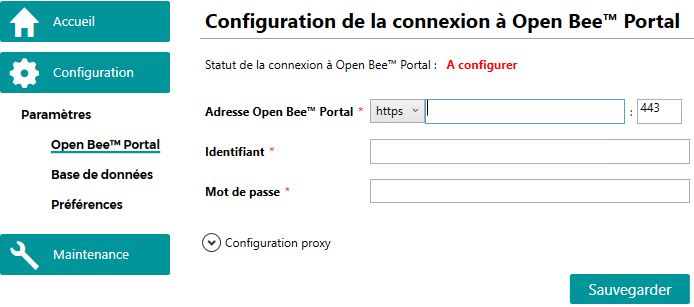
The first information to be provided concerns the connection to Open Bee™ Portal.
Database
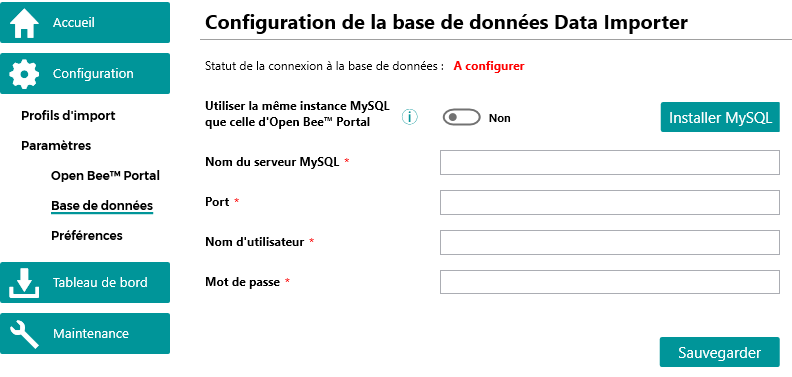
The Open Bee™ Data Importer application uses a MySQL database to store the configuration as well as all the extracted and imported documents.
Use this screen to configure the connection to this database.
If you want to use the same MySQL instance as the Open Bee™ Portal database, simply check the corresponding option and click on “Save”.
Remark
This option is only available if the Open Bee™ Portal installation is on-premise.
In the case of a Open Bee™ Portal , you will first need to install the MySQL database engine, if you have not already done so.
In case the MySQL database is on a different instance than the Open Bee™ Portal database it is necessary to enter the server name, port, login and password.
If MySQL is not installed, an installation procedure is available on this page.
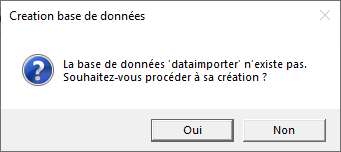
When backing up the configuration, the application checks to see if the dataimporter database already exists.
If it does not exist, clicking “Yes” will automatically create the database.
Preferences
A preferences screen allows you to configure the language of the application as well as the number of versions to be sent to Open Bee™ Portal.
This last parameter reduces the import time in the case where documents have many versions and only the latest versions need to be imported.