How are documents retrieved from Documalis?
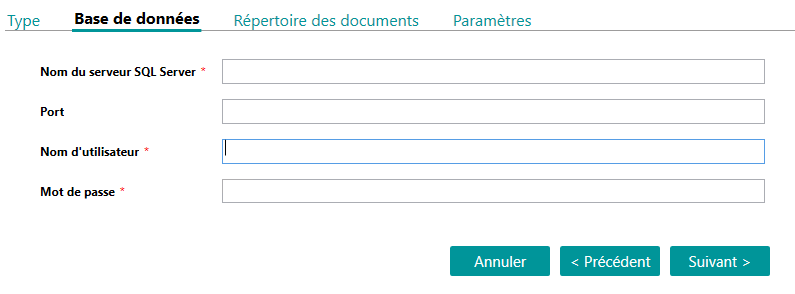
Documents and versions to be retrieved are retrieved from the SQL Server Documalis database.
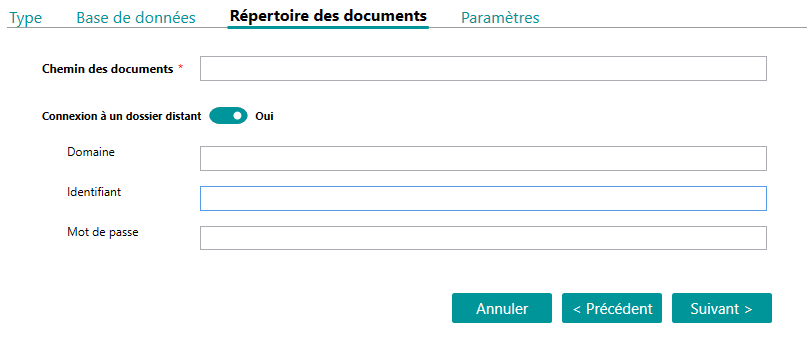
The content of the documents is retrieved from a file server.
This information must be configured in the steps described below.
Setting up a Documalis import consists of creating an import profile from Open Bee™ Data Importer and manually editing the collation rules and metadata association files.
Configuration Documalis
The Documalis Import Profile Setup Wizard is broken down into 4 steps
- Type
Selecting the Documalis import type
- Configuring the Documalis SQL Server Database Connection
- Configuration of the directory where Documalis documents are stored
- Setting up “doc_roots”, “doc_paths” and import dates
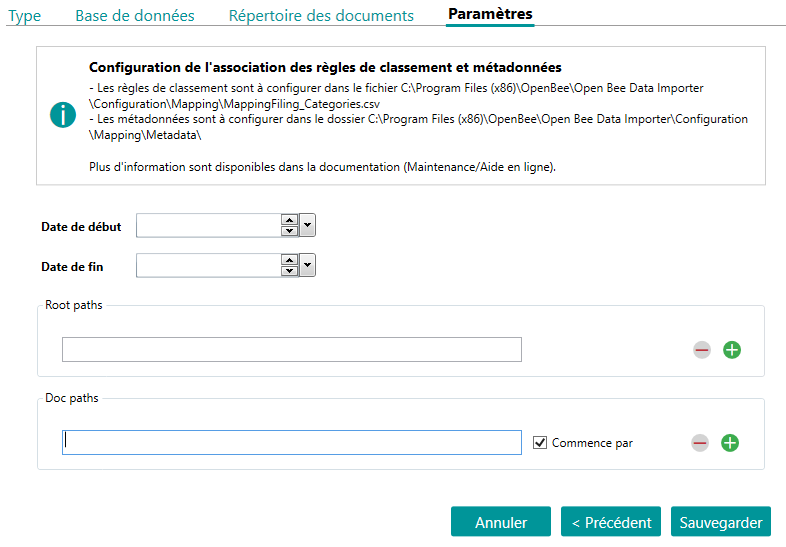
- Dates
- Start Date: If this field is entered, only documents with a modified date greater than or equal to this date/time will be imported
- End Date: If this field is entered, only documents with a modified date that is less than or equal to this date/time will be imported
- Note : It is possible to fill in only one of these two fields
- Root paths: Specify as many tags as doc_root to import (corresponds to the doc_root field of table doc_documents)
- Note : At least one Root path must be filled in
- Doc paths: Specify as many tags as Doc_path to import (corresponds to the Doc_path field of table doc_documents)
- Note 1: This field is optional, it allows you to filter on the documents to be imported. If no doc_path is entered, no filter will be made on this column
- Note 2: It is possible to filter on the beginning of a path (“Starts with” checked) or on the exact path (“Start with” unchecked)
Combining Ranking Rules
To import documents from Documalis, it is necessary to define which Open Bee™ Portal collation rule should be used for each Documalis path.
It is possible to define a different collation rule for each Documalis path (doc_path).
Each path (doc_path) must be present in the collation rules association file.
The same collation rule can be used for different paths (doc_path).
The configuration must be manually modified in the file C:\Program Files (x86)\OpenBee\Open Bee Data Importer\Configuration\Mapping_Filing_Categories.csv
This CSV file must contain one line per Documalis path.
The first piece of information to be provided is the Open Bee™ Portal collation rule identifier and the second is the Documalis path (the two values are separated by a semicolon).
The Documalis classification rule corresponds to the doc_root and the concatenated doc_path
Example:IdFilingCategoryPortal;IdFilingCategoryDms11311;DOCROOT1\OPERATIONS\11312;DOCROOT2\TECHNICAL\DISBURSEMENT ACCOUNT\11312;DOCROOT2\OPERATIONS\LEGAL ADVICES\
The identifier of an Open Bee™ Portal ranking rule can be retrieved from the URL by navigating to the ranking rule.

Metadata associations
For each collation rule, the association between the Documalis variables (table doc_variables) and the Open Bee™ Portal metadata must be defined.
The association between Documalis variables and Open Bee™ Portal metadata is to be configured in the files in the C:\Program Files (x86)\OpenBee\Open Bee Data Importer\Configuration\Mapping\Metadata folder.
This folder must contain one file per Open Bee™ Portal collation rule previously defined in the Mapping_Filing_Categories.csv file.
The file names are the identifiers of the Open Bee™ Portal ranking rules with the extension . CSV.
The first column of the CSV file corresponds to the identifier of the Open Bee™ Portal metadata and the second column corresponds to the name of the Documalis variable.
A third column can be added if the Documalis variable is numeric type (; Numeric) or date type (; Date)
Example file “11317.csv” (classification rule ID=11317)
IdMetadataPortal;IdMetadataDms11561;__VariableDocumalis111562;__VariableDocumalis2;Numeric11563;__VariableDocumalis3;Date11564;__VariableDocumalis4
The identifier of an Open Bee™ Portal metadata can be retrieved from the URL by navigating to the metadata.

Replacing Metadata Values (Optional)
The C:\Program Files (x86)\OpenBee\Open Bee Data Importer\Configuration\Mapping\Metadata_Replace_Value.csv file is used to define metadata values to be replaced.
The override will only be performed if the value (first information in the CSV file) exactly matches that of the Documalis variable
Example
Value; ReplaceValue
My value before replacement; My new value after replacement
My value before replacement2; My new value after replacement2