Add a new folder
To add a new folder from the “Documents” interface, please tap the  , and then select the appropriate option:
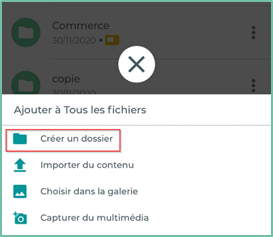
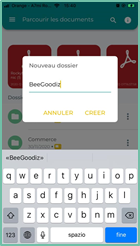
A pop-up will then appear and allow you to enter the name of the folder.
Click on the ” CREATE” to add the folder to your document management.
Actions on folders
Various actions can be performed on folders from the “Documents” interface:
 |
Explore: browse the files and interact with its contents |
 |
Information : View folder properties |
 |
Comment: view and add comments on folders |
 |
Favorites : add/remove folders from your favorites |
 |
Rename : Rename folders |
 |
Move : Move folders to another folder |
 |
Copy : copy the folders to another folder |
 |
Delete : Delete the folder and its contents |