General Settings 
You can access the settings of your Open Bee™ Mobile app via the  of the menu.
The Settings interface consists of 4 sections :
Account
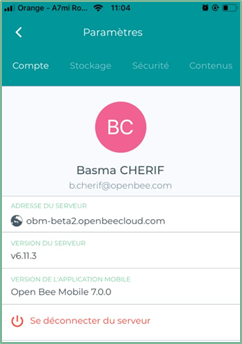
This interface allows you to access various information such as:
- Your name and email address of the user you are logged in with
- The version number of the mobile app
- The Open Bee™ Portal document management system you are logged in to and its version number
- Sign out of the app
Storage
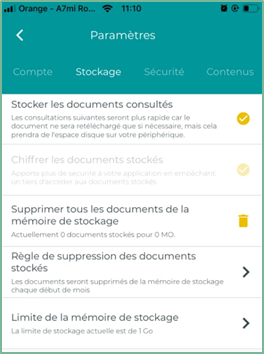
This view displays various information related to document storage such as:
- Storage of viewed documents
- Encrypting stored documents
- Deleting all documents from storage
- Stored Document Deletion Rule
- Storage Memory Limit
Security
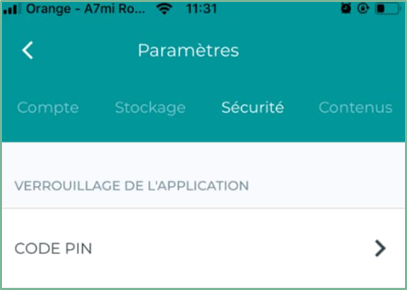
This view allows you to protect your app and the content stored on your device from unauthorized access by setting a PIN as a screen lock method (
See Configure app security
)
Content
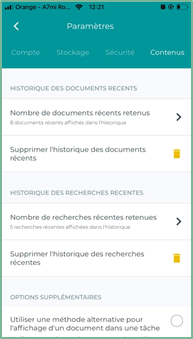
This view allows you to access various information and actions such as :
- The number of recent documents selected
- Deleting the history of recent documents
- The number of recent searches selected
- Deleting recent search history
Additional Options
Help 
The ” Help » includes several elements.
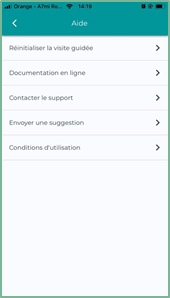
Reset the guided tour
You can restart the guided tour at any time by clicking on the “Reset guided tour” option, then click on “OK”
Online Documentation
The online documentation allows you to access the user manual directly online at any time
Contact Support
This action will offer you to send an email to support via one of your email applications installed on your device.
Send a suggestion
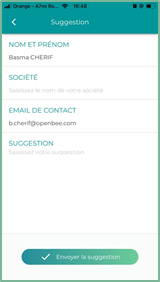
You have the opportunity to send us your suggestions for categories and improvements.
Suggestions can be sent via our form in the following interface:
Terms of Use
In this interface, you will find the General Terms and Conditions of Use of the Open Bee portal.