Duplicate management
Smart Capture allows for very fine management of duplicate document recognition. This can be configured for each model, for the entire application, by folder or by third party.
Parameterization
This setting can be found in the “Document type” tab, “Templates” tab.
You then have to click on the button  to bring up the other options (modification and deletion)
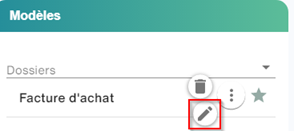
Click the pen button to access the Template details for a third party to set up the template associated with the third party or folder.
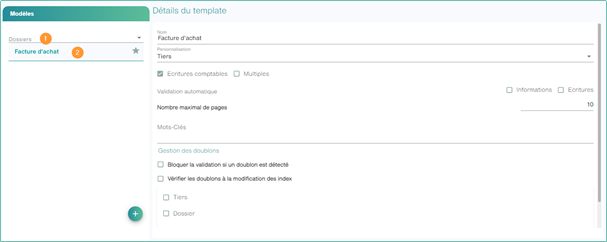
Select the Block validation if a duplicate is detected checkbox, this feature allows you to block the validation of documents detected as duplicates. The video coder will have to modify a duplicate value to validate his document. This option can be coupled with the duplicate check when I modify my index: each time I make a change, Smart capture will do a new duplicate search. As this search can be long, it is not recommended for operators looking for input speed.
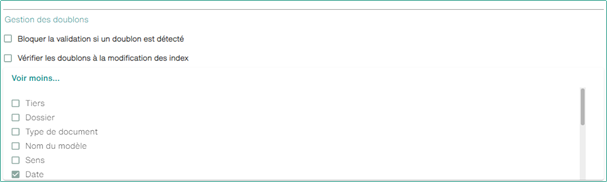
Click “See More” to open a panel containing the duplicate management configuration.
The bottom part contains a list of indexes available for the selected model. Each checked field will be used to identify potential duplicates.
By default, duplicate detection is based on
- The date of the document
- Invoice number
- The amount incl. VAT
Display
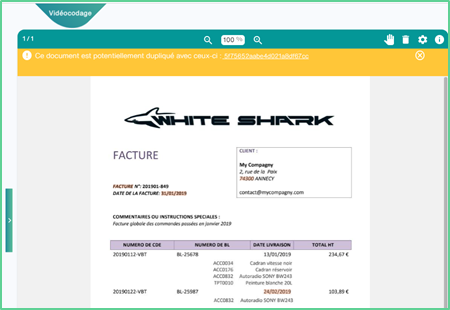
When opening the document, a banner will appear to remind you of the presence of a duplicate. It is then possible to open the document with which a duplicate has been detected by clicking on the document number.