Smart Capture’s accounting import allows you to import the chart of accounts from the accounting software. Thanks to this import, Smart Capture will be able to know the different accounts, financial years and accounting journals used in the user’s accounting.
To set up an accounting import, simply go to the Folders page -> Accounting -> Account Management
Click on the icon
The following window appears 
The following window appears
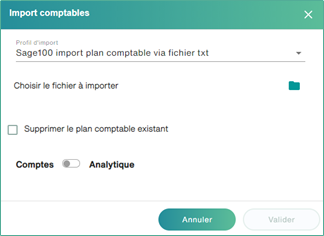
Choose the import profile you created on the “Import Profile” page
Click on the folder icon in the case of a file import
Delete Chart of Accounts: If you check this box, Smart Capture will erase your already imported data and replace it with the new ones. If this box is not checked, Smart Capture will update the data that has already been imported, import the new data it does not know, and keep the old ones.
Choose whether you want to import Cost Breakdown from your accounting software or not
Only in the case of a file import. The choice is stricter:
- Either we import the accounts
- Either we import the analytical breakdown
For the types of imports, different profiles will be proposed:
- Text / CSV files (Also accepts Excel format)
- Text/XML Files
- SQL (Requires Gateway connection)
- Sage OMC (Requires Gateway Login)