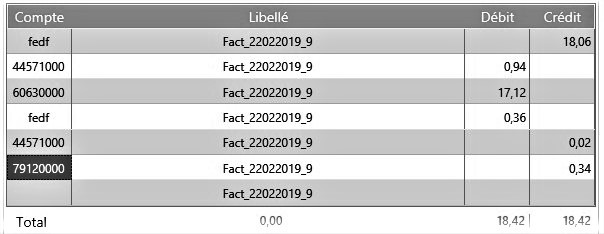
How do I manage discount rates by supplier?
Complete the discount rate in the third-party account configuration: in Accounting/Account Management
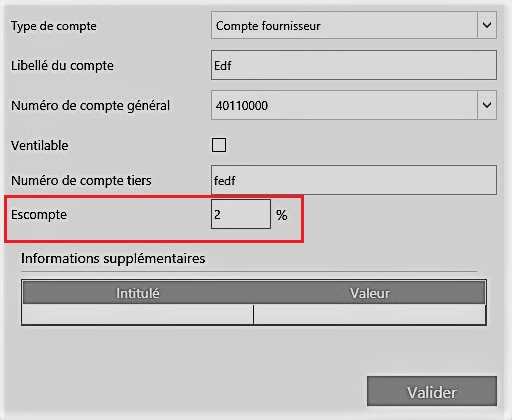
It is also possible to import the discount rate when importing the accounting of third-party accounts.
The discount rate can only be imported with the BDD import or the Sage OM import.
In this type of import, the imported discount value will always overwrite the discount value entered in the third-party account configuration
When entering the entries, the first time, you will have to “Authorize Discount” by right-clicking on your entries.
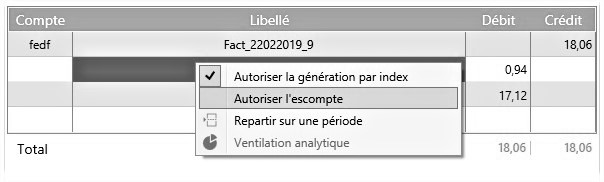
This will duplicate your lines with the discount calculated from the value of the third-party account. Open Bee™ Scan Capture completes the line corresponding to the business partner and it will complete the line of the VAT account when it is entered.
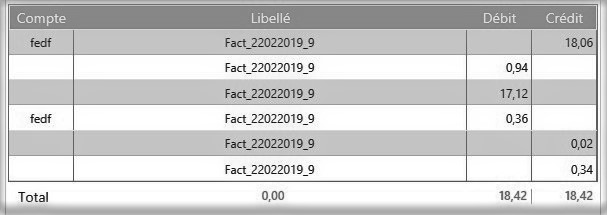
All that’s left to do is complete the accounts to validate.