The Windows output allows Open Bee™ Scan Capture to export the encoded video documents to a file tree. This output allows you to retrieve the pdf document. But it is also possible to generate a file that will contain the information of the document.
The user running the Open Bee™ Scan Capture server service must have write and read rights to the destination folder in the tree.
Export Scheduling
For more details on how to schedule the output export, you can consult the Batch Export page
Pending documents
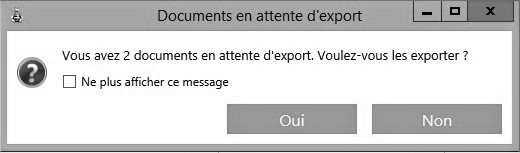
When you exit Open Bee™ Scan Capture, you may see the following message. Documents have not been uploaded to Windows output because the document limit has not been reached, or the export is set up manually. If you want to export the documents, click yes to go to the document export page. Otherwise, you can click no to dismiss the message and exit Open Bee™ Scan Capture.
Configuration file
The configuration of this output is done using the configuration located in About / Maintenance / Configuration.
By default, this configuration contains:
OutputRawXSLPath=
OutputPDFFileNameXSLPath=~/OutputFolder/PdfFileName.xsl
OutputXMLFileNameXSLPath=
dateFormat=dd/MM/yyyy
decimalSeparator=.
The first 3 lines indicate xsl files. The following lines contain additional parameters related to the export of the document, such as the date format or the decimal separator.
Output Destination
In the previous configuration, the output location is defined by the lines:
OutputPDFFileNameXSLPath=~/OutputFolder/PdfFileName.xsl
OutputXMLFileNameXSLPath=
Which respectively indicate the destination of the PDF document and the destination of the generated information file.
The destination is expressed in the form of an xsl file that allows you to create a tree structure based on the information detected on the document by Open Bee™ Scan Capture.
Information File
A file containing the document information can be generated by Open Bee™ Scan Capture. To do this, it is necessary to provide a descriptor. This descriptor is also in xsl format.
This file is defined by the line:
OutputRawXSLPath=
If no file is populated, a document is still generated. It will contain all the information available on the document in raw form.
XSL Descriptors
XSL descriptors are files that allow you to transform the raw information in the document into any other format.
Definition : XSL (eXtensible Stylesheet Language) is the W3C style sheet description language associated with XML. This is a file that describes how XML documents should be transformed.
For more information: https://www.w3.org/TR/xslt
Notions
Simple Text
<xsl:text>Text simple</xsl:text>
Use a variable
<xsl:value-of select="Invoices/Invoice/Buyer/MasterData/Data[@Name='CODE_BUDGET']/@Value" />
Conditions
<xsl:if test="Invoices/Invoice/Buyer/MasterData/Data[@Name='CHEMIN_DE_SORTIE']/@Value != ''">
</xsl:if>
<xsl:choose>
  <xsl:when test="Invoices/Invoice/Buyer/MasterData/Data[@Name='CHEMIN_DE_SORTIE']/@Value != ''">
    <xsl:text>J'ai un chemin</xsl:text>
  </xsl:when>
  <xsl:otherwise>
    <xsl:text>Je n'ai pas de chemin</xsl:text>
  </xsl:otherwise>
</xsl:choose>
Loops
<xsl:for-each select="Invoice/Fields/Field">
</xsl:for-each>
Replacing a Character
Sometimes it can be useful to replace a character in a variable on the fly when exporting the document. A common example is the invoice number containing the “/” character when used in the output path generation. In this situation, it is necessary to use a function:
<xsl:stylesheet version="1.0" xmlns:xsl="http://www.w3.org/1999/XSL/Transform">
<xsl:template name="string-replace-all">
<xsl:param name="text" />
<xsl:param name="replace" />
<xsl:param name="by" />
<xsl:choose>
<xsl:when test="$text = '' or $replace = ''or not($replace)" ><!-- Prevent this routine from hanging --><xsl:value-of select="$text" /></xsl:when>
<xsl:when test="contains($text, $replace)"><xsl:value-of select="substring-before($text,$replace)" /><xsl:value-of select="$by" /><xsl:call-template name="string-replace-all"><xsl:with-param name="text" select="substring-after($text,$replace)" /><xsl:with-param name="replace" select="$replace" /><xsl:with-param name="by" select="$by" /></xsl:call-template></xsl:when>
<xsl:otherwise><xsl:value-of select="$text" /></xsl:otherwise>
</xsl:choose>
</xsl:template>
<xsl:variable name="newInvoiceNumber"><xsl:call-template name="string-replace-all"><xsl:with-param name="text" select="Invoices/Invoice/Fields/Field[@SubTypeName='INVOICE_NUMBER_INDEX']/@Value" /><xsl:with-param name="replace" select="'/'" /><xsl:with-param name="by" select="'_'" /></xsl:call-template></xsl:variable>
<xsl:template match="/Invoices">
  Nouveau numéro : <xsl:copy-of select="$newInvoiceNumber" />
</xsl:template>
</xsl:stylesheet>
Complex example
Put the unique number of a document, 10 digits
<xsl:value-of select="substring(concat('0000000000', Invoices/Invoice/@ShortId), 1 + string-length(Invoices/Invoice/@ShortId), 10)" />
Useful links
To help you build .xsl files, you can use the online editor to test them: https://www.w3schools.com/xml/tryxslt.asp?xmlfile=cdcatalog&xsltfile=cdcatalog_if
All you have to do is copy/paste a RAW file into the XML code part and enter the contents of your xslt file in the XSLT part.