Field Descriptions
When a document is interpreted, Open Bee™ Scan Capture tries to determine if the third party already exists in the “third-party repository” of the folder.
To do this, Open Bee™ Scan Capture tries to capture the information of the third party according to its type which is directly related to the type of document found (see Type Management Page).
Each of its types is fed by identifiers previously configured within the software (see Third-party indexes page)
Keyword identifiers
Keyword identifiers allow for a simple third-party search by directly comparing the keywords entered by the user with the recognized text for the document. (See How keywords work)
WARNING: The fields used when recognizing third parties are not customizable.
Third Party Detection
Third Party Detected
If one or more of these pieces of information match that of a third party’s record in the “third-party repository”, then Open Bee™ Scan Capture will automatically assign that third party to the document without opening their record (you can always access the party’s record with the button  ).
).
Third Party Not Detected
If none of this information matches a third party, the third party’s field will be red
Open Bee™ Scan Capture will ask you to tell it the name of the party to use for this document:
- If the party already exists: This will be displayed in a list as you enter its name and you can select it.
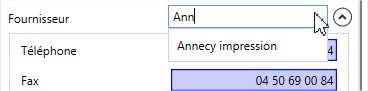
If the third party was not positioned when the document was opened, it means that the information contained in that third party’s record did not allow Open Bee™ Scan Capture to identify it. We therefore advise you to correct or complete the information entered in the third party’s file.
Special case: If this form does not contain any information, Open Bee™ Scan Capture will display a message inviting you to fill in some information or to use the values it has detected to fill it in.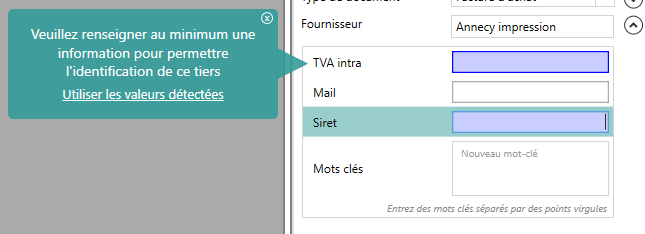
- If the business partner does not exist: Open Bee™ Scan Capture will create this new business partner using the name you have entered and offer you the information it has detected on the document to directly enrich its third-party file.
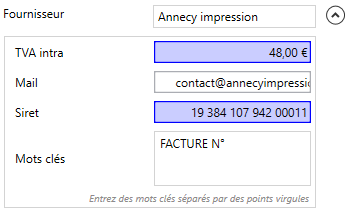
Third-party listing details
When Open Bee™ Scan Capture offers a third party to the user, its form can be composed of several colors:
 In the case of a new business partner, if a value has been detected, it is pushed directly into the business partner master record
 The information detected corresponds to the third-party record and has made it possible to identify the third party on the current document
 The detected information is different from the third-party record, the icon
  allows you to change between the detected value and that of the record