File export is suitable for most applications. A text file is generated from the lines of entries made. This file will be saved by the console on the user’s computer when exporting each batch.
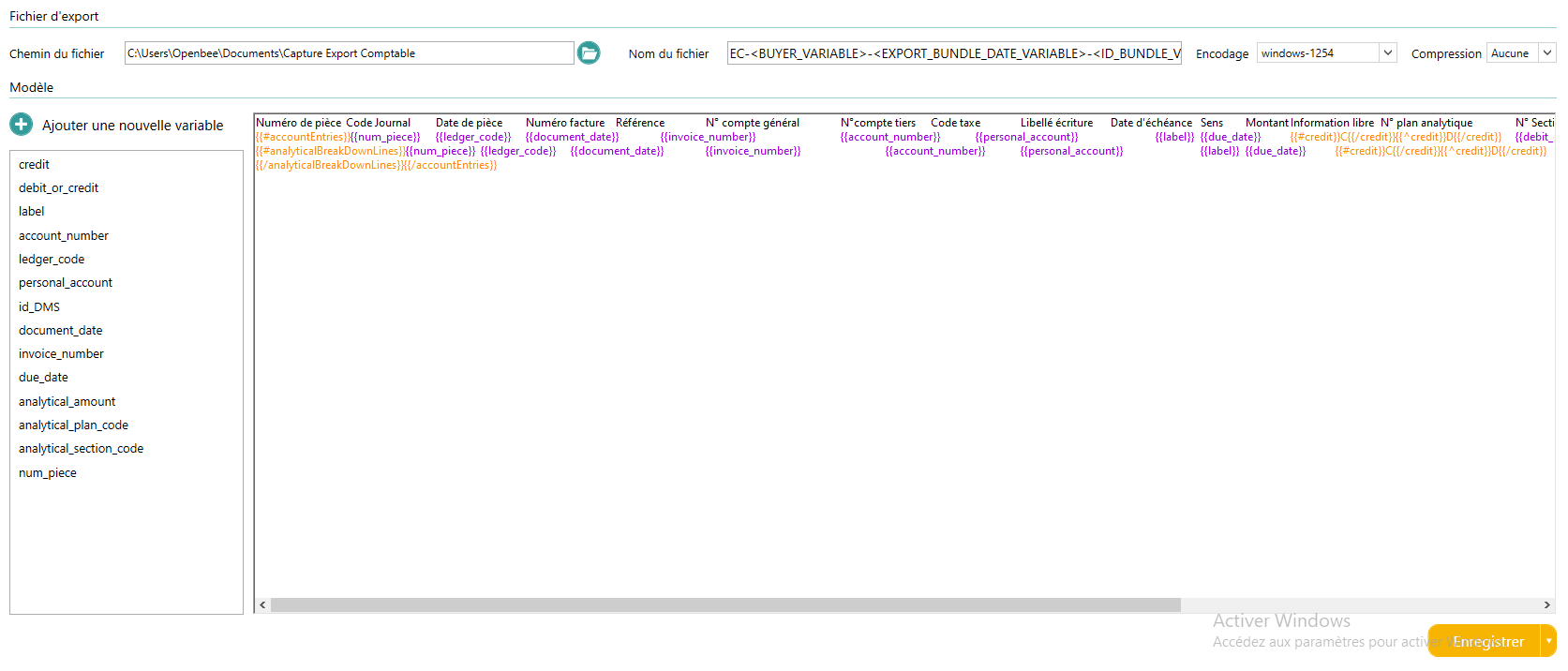
The file export configuration interface is composed of two main sections:
- Export file : This part deals with the shape of the generated file.
- Template : Allows you to define the structure of the contents of the exported file.
Export file
This part deals with the shape of the generated file. It allows you to name the file, encode it, and drop it to a specific location.

File Path
The file path is used to define the location of the file generated by Open Bee™ Scan Capture. When exporting a batch, the file will be placed directly in that location.
In case this value is empty, a window will then ask the user where to export the file generated when exporting the batch.
File Name
The name of the file is free, but it must be followed by the desired extension. If this is not the case, a file without an extension will be generated.
Encoding
Encoding is used in very special cases to improve the handling of special characters. If no encoding is selected, the system encoding will be applied.
Compression
The compression option allows you to zip the export file with the relevant PDF documents for it.
Working with Variables
It is possible to insert variables specific to Open Bee™ Scan Capture in the file name or path. To display the list of available variables, simply use the “%” character with the cursor in one of these fields. The variables available depend on the batch or folder concerned by the export, in fact several documents can be exported simultaneously, so it is not possible to use a particular variable present on one of them for the name or path of the file.

Model
For more information on how to configure the Mustache model, you can consult the Mustache model page
These tags are pre-integrated into Open Bee™ Scan Capture to allow it to iterate over certain objects and therefore allow the construction of the output file:
| Variable | Context | Use | Open Bee™ Scan Capture version |
|---|---|---|---|
| vatAccounts | Allows you to iterate on VAT accounts | 2.4.1 | |
| simpleAccounts | Allows you to iterate on expense accounts | 2.4.1 | |
| personalAccounts | Allows you to iterate on third-party accounts | 2.4.1 | |
| accountEntries | Allows you to iterate over ledger entry lines | 2.4.1 | |
| analyticalBreakDownLines | accountEntries | Allows you to iterate over analytical breakdown lines | 2.4.1 |
| analyticalBreakDownLines_x | accountEntries | x = the number representing the index of the analytical breakdown line. 1<=X<Infinity | 3.4.4 |
| isImported | vatAccounts, simpleAccounts, personalAccounts | Allows you to test whether or not an account has been imported | 2.4.1 |
| isReferenced | vatAccounts, simpleAccounts, personalAccounts | Allows you to test whether the account is referenced in the entries located in the accountEntries tag | 2.4.1 |
| isClient | personalAccounts | Allows you to test whether the third-party account is a customer account | 2.6.3 |
| isSupplier | personalAccounts | Allows you to test whether the third-party account is a vendor account | 2.6.3 |
| isVATLine | accountEntries | Allows you to test whether the entry line contains a VAT account | 2.7.1 |
| isPersonalLine | accountEntries | Allows you to test whether the entry line contains a third-party account | 2.7.1 |
| isClientLine | accountEntries | Allows you to test whether the entry line contains a customer account | 2.7.1 |
| isSupplierLine | accountEntries | Allows you to test whether the entry line contains a vendor account | 2.7.1 |
| isChargeLine | accountEntries | Allows you to test whether the entry line contains a load account | 2.7.1 |
| HasAnalyticalBreakdown | accountEntries | {{#….}} Allows you to test whether the write line has analytics OR {{…}} to get the number of analytic lines for a write line | {{#….}} 3.1.0 AND {{…}} 3.4.4 |
| isFirstAccountEntryLine | accountEntries | Allows you to test whether the entry line is the first of the entry lines associated with the current document | 3.2.1 |
| isLastAccountEntryLine | accountEntries | Allows you to test whether the entry line is the last of the entry lines associated with the current document | 3.3.0 |
| VAT_VariableName | accountEntries | Allows you to obtain information about a variable in the VAT account associated with the current line
Example: On a load line {{ |
3.4.0 |
| VariableName_sum | Allows you to get the sum of the variables of an index included in a groupExample: {{HT_1}} permet d'obtenir la 1er valeur de HT alors que {{HT_sum}} permettra d'obtenir la somme des montants HT. |
4.4.0 | |
| VariableName_current | Retrieves the variable corresponding to the idUnit in relation to the current entry line
Example: |
4.4.0 |
Tags that have a context can only be used within the context.
Example: The analyticalBreakDownLines tag can only be used inside accountEntries tags
Encoding problem on a variable
When a final value contains a special character, it can happen that the character is incorrectly encoded.
To write the raw value and avoid encoding problems, you can use the & character in your variable.
Ex {{tiers}} becomes {{&tier}}
Additional Information Variables (Available in version 3.4.0)
Additional information variables are used like this:
1) Choose the source “Additional Information” from the list available for a new variable and then name your variable
2) Use your variable like any other, but followed by “_CleDeLinformationSupplementaireVoulue”.
Example:
- Specified variable name: InfoLib
- Key to the additional information required: PROFILTVA
- rendered in template text: {{infoLib_TVAprofile}}
Pre-set exports
Some formats are integrated as soon as Open Bee™ Scan Capture is installed and are almost ready to use. However, some templates contain tags enclosed in square brackets “[]”. This is the case for [MY_CODE_EXPERT] and in [MY_NUMERO_DOSSIER] the following example:
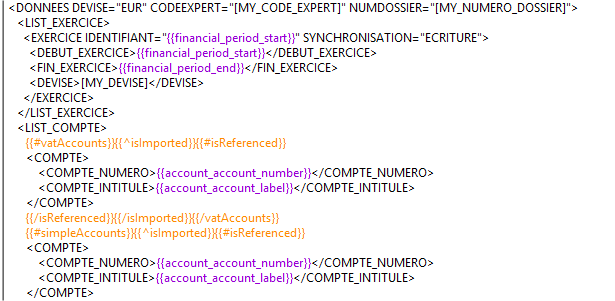
These variables indicate that a value is required at that location. These are elements that should be replaced by variables, or fixed values, when setting up Open Bee™ Scan Capture.