Reminders allow you to be notified on a predefined date.
A reminder is associated with a folder or document. This makes it an ideal tool for managing recurring or auto-renewing contracts and subscriptions.
Create a reminder
A reminder is created using the menu on documents or folders.
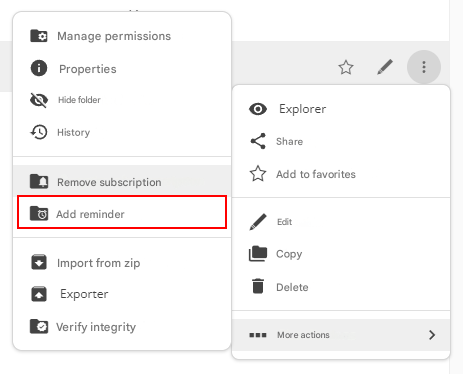
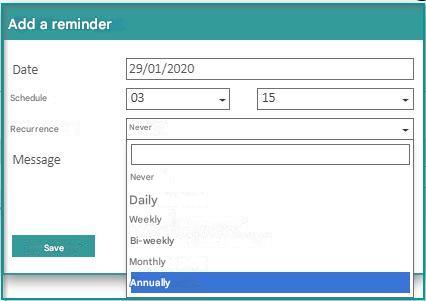
In both cases, the reminder creation form contains the following fields:
- Recall date
- Reminder time
- A possible recurrence
- A follow-up message that will be displayed in the reminder
Edit or delete a reminder
To edit a reminder, click on your profile picture and select “Manage my reminders” from the drop-down menu.
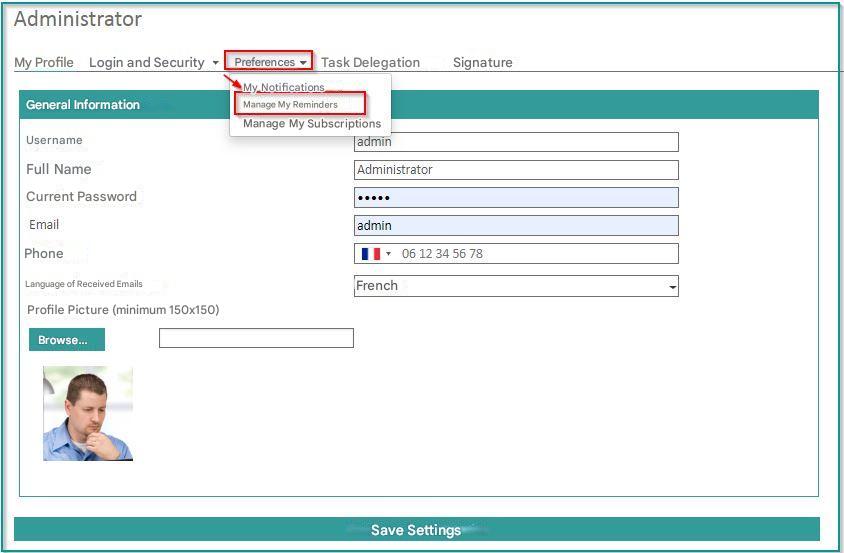
A screen then allows you to view all your reminders.
To delete or edit a reminder, simply click on the corresponding icons in the “Actions” column.

Notification of recalls
When a callback is triggered by Open Bee™ Portal, the user is notified:
- In the dashboard: “Reminder” tile

- By email, if the user has enabled the email notification function in their preferences.