Since version 6.13.0 of Open Bee Portal, it is possible to restrict the use of a classification rule to a certain type of document in order to avoid user errors.
This is because some actions or workflows may require the document to be added in a specific format.
Configuration
At the ranking rule level, it is now possible to activate this option.
Restricting classification to file formats is tantamount to allowing classification only to those formats. The restriction can only apply to certain groups or users.
If a user is assigned multiple restrictions, then they will be able to categorize all documents that comply with those restrictions.
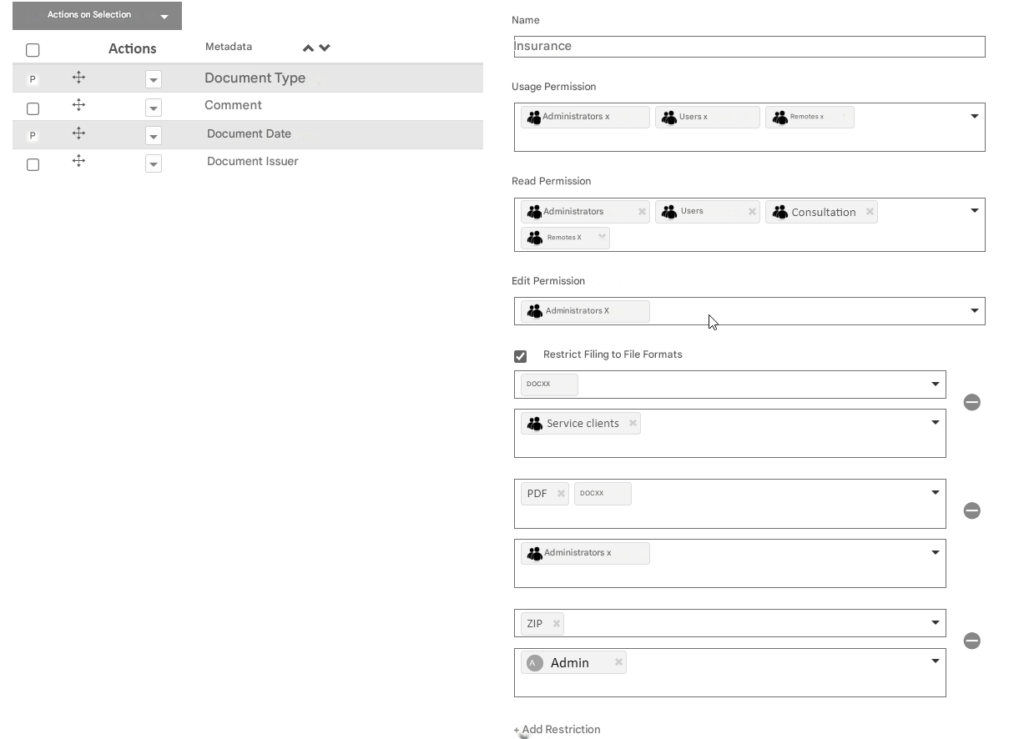
Users in the Customer Service group will only be able to file documents in ” DOCX” format with the Insurance rule.
Users in the Administrators group will only be able to file documents in ” DOCX ” and ” PDF” format with the Insurance rule.
The Admin user who is also a member of the Administrators group will only be able to file documents in “DOCX”, “PDF” and “ZIP” format
A user who does not belong to any of these groups will be able to classify any document format.
It is possible to add a restriction to all Open Bee Portal users using the “Everyone” placeholder group
Application of the restriction
This restriction is verified and enforced in the following ways:
- Adding a document to the Open Bee Portal from the WEB application, Mobile or via Web Services
- Adding a new version of the document
- Changing a document’s classification rule to a classification rule containing a restriction