Description of the problem
- You imported users from an Active Directory.
- The SSO option is enabled. Users automatically log in with their Windows sessions
- You have changed the password of the Active Directory account used to import users
- No more users can log in via SSO
Impacted version
Versions < 6.4.1
Cause
The login data of the Active Directory account used to importusers has been stored encrypted in Open Bee™ Portal in order to :
- enable automatic updating of user account information from Active Directory to Open Bee™ Portal
- Verify that the Windows user is valid with Active Directory during SSO authentication
Once your password has been changed, these operations performed by Open Bee™ Portal are no longer possible and block the SSO authentication of users.
Solution
- Log in with the Open Bee Portal ‘admin’ account
- Go to “User Administration > “, then click on “LDAP Import”
- Enter the login information for your Active Directory here:
- Use your Windows account (and therefore your new password)
- Uncheck the box ” Import users: manually select users to import and update automatically.
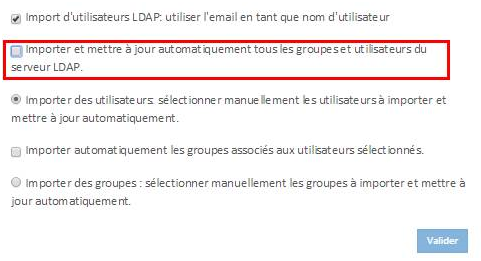
-
- Validate. If your credentials are valid, they will be saved at this stage (which was the intended goal). In the next step, the list of Active Directory users should appear. You can then close the window.
- Validate. If your credentials are valid, they will be saved at this stage (which was the intended goal). In the next step, the list of Active Directory users should appear. You can then close the window.
Open Bee™ Portal now knows your new Active Directory password and will be able to authenticate and synchronize users again