This interface allows you to customize the configuration of the application.
It is divided into several subsections:
To access, click on “Administration” “Manage General Configuration“.
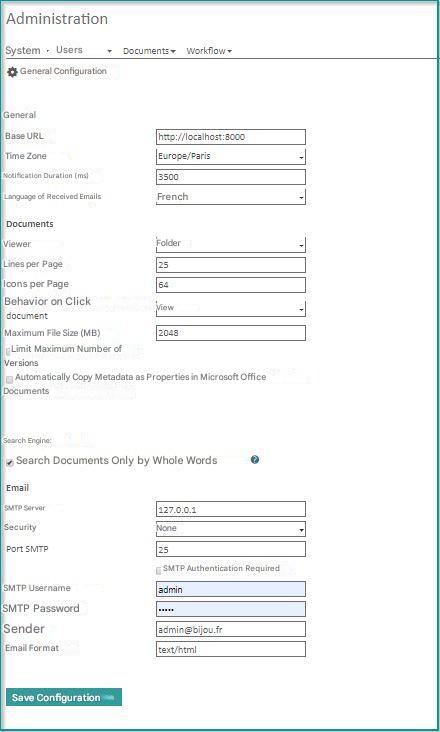
General
- Base URL : Open Bee™ Portal address
- Time zone : Allows you to have the local date in the different Open Bee™ Portal histories
- Duration of notification: The amount of time, in milliseconds, that system messages are displayed, after each action is executed. (Example: “Successfully Registered Group”)
- Language of emails received:
Documents
- Viewer : The default display mode in the Open Bee™ Portal folder/document browser. You can choose between Folder, Icons or Thumbnails.
- Row per page: The number of items to display per page in the Folder/Document Explorer. This setting is valid for both list and thumbnail viewing.
- Icon per page: The number of items to display per page in the Folder/Document Explorer. This setting is valid for the icon display.
- Behavior when clicking on a document: “Preview” allows you to redirect to the document preview screen in Open Bee™ Portal. “Download” starts a download of the document on the client computer.
- Maximum File Size : The value in MB of the maximum size allowed for adding ZIP folders/documents. The maximum is 100MB by default. Importing larger data is possible with Open Bee™ Sync .
- Automatically copy metadata as properties in Microsoft Office documents
Search engine
This feature makes it possible to find documents more quickly, by configuring the search engine to analyze only occurrences corresponding to whole words.
This feature must be disabled if you want to find documents according to one or more characters (strongly recommended for documents written in an Asian language). If deactivated, search times will be increased.
- SMTP server: The address of the SMTP server is used to send the various email notifications (e.g. email notification when a new user is created)
- Security : Whether or not to use a secure protocol such as TLS or SSL
- SMTP port : SMTP server port (default port 25)
- SMTP Authentication Required : Check this option if the SMTP server requires authentication.
- SMTP Username : Required field when using an authenticated SMTP server.
- SMTP Password : Required when using an authenticated SMTP server.
- Sender: The email address from which the various notifications will be sent.
- Email format: By default it is text/html (preferably do not change this value, so that the notification email is not considered as SPAM)
Limit the maximum value of versions
To keep only the latest version of the document, it is possible to change the value (Limit the maximum value of versions to 1 or more)
Office Document Reader/Editor
Use this section to configure how Office documents are viewed and edited in the Open Bee™ Portal.
More details are available on the configuration and usage pages.