This feature makes it possible to strengthen the security of access to Open Bee™ Portal by adding a second authentication factor in addition to the username and password login.
It is available as an option.
Installing and activating the GoogleAuthenticator addOn
Beforehand, the EDM administrator must install and activate the GoogleAuthenticator addon.
View documentation Open Bee™ Portal to find out how toinstall or update an add-on.

Enable two-factor authentication
Go to the “Administration > , Security > , Authentication” section to enable strong authentication. Two configurations are possible:
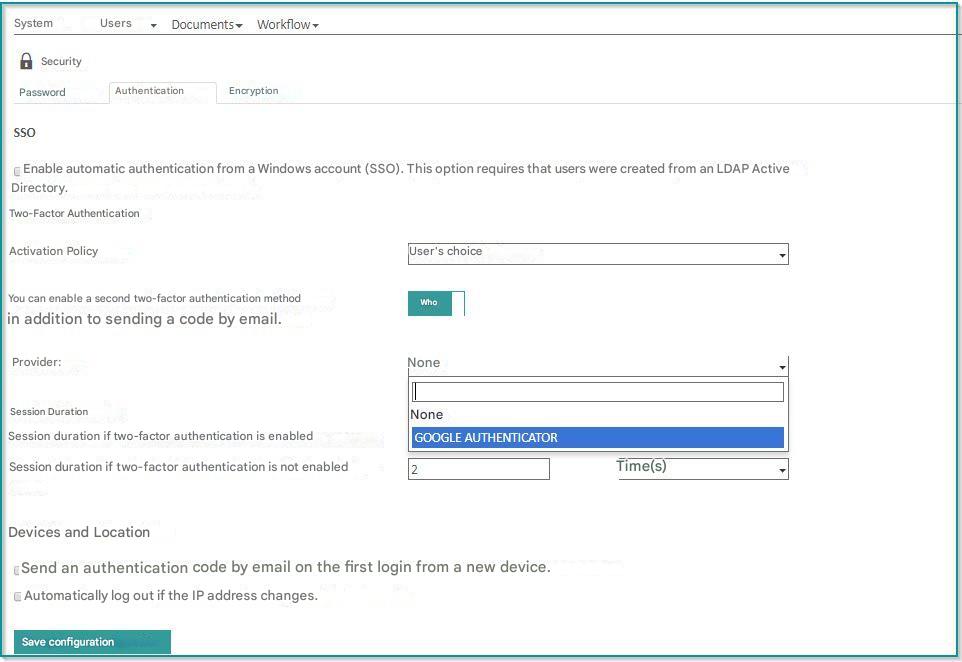
Activation Policy
- User choice : Users will be able to choose whether or not to use this feature.
- Required : Users will be forced to use this system. Future users created will use this system by default.
Choosing a Second Two-Factor Authentication Mode
- Provider: Lists the different modes of two-factor authentication available in addition to the default mode: sending by email.
The Google Authenticator option only appears here if the addon is well installed and active.
Once this configuration is completed, two-factor authentication via Google Authenticator is available to all Open Bee™ Portal users.
 It is not possible to impose a two-factor authentication mode on the user, he keeps the choice to use either the default mode, sending email or this new mode.
Two-factor authentication by Google Authenticator is now ready to use, more details on how to use it here.