The auto-share feature allows you to trigger the sharing of a document automatically based on metadata values.
To set up automatic sharing, click on “Administration“, “Sharing“, then on the “Automatic sharing” tab.

Then add a new trigger for automatic sharing by clicking on the “New Autoshare” button
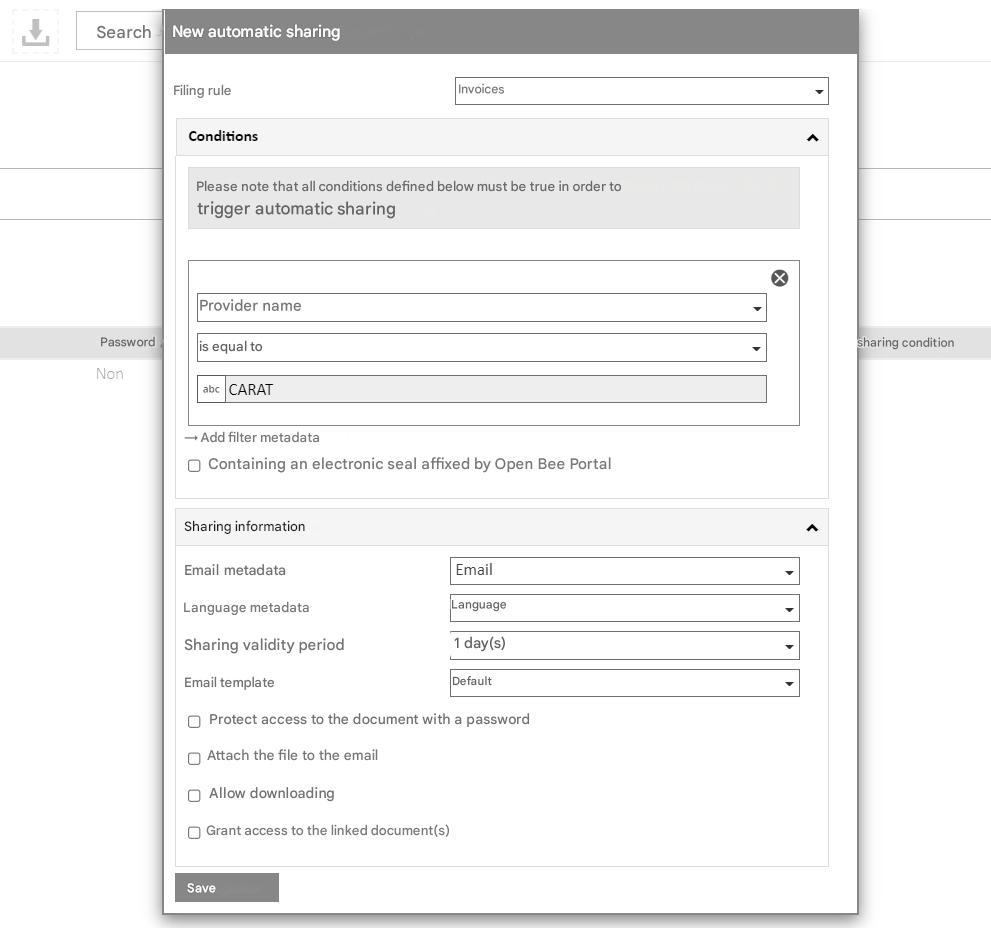
Conditions
Select the criterion that will trigger automatic sharing. In the screen above, documents filed with the “Invoices” rule will be shared automatically if the vendor name is CARAT.
Tests can be performed on multiple metadata values. In this case, all conditions must be true to trigger the share.
If the classified document is subject to a server stamp applied by the solution, the document will be shared twice:
- the first time when the original document is added
- a second time when the new version containing the electronic stamp is added
It is possible to specify that only the version containing the stamp should be shared.
 Only the Universign electronic seal is functional with this option. This option does not work with the RGS stamp*.
Sharing Information
- Email metadata: Select the metadata that will contain the emails to which the share will be addressed.
 It is possible to provide multiple emails in this field separated by commas “,” The “Email” metadata of a form can be used in addition to the classic “Text” and “List” metadata
 - Metadata language (You can choose the language of the email) The language will be determined by the content of the selected metadata.
The expected format in the metadata is the ISO format on 2 letters: https://fr.wikipedia.org/wiki/Liste_des_codes_ISO_639-1 - Duration of the sharing
- Email Template Used
Language selection by metadata
Le fonctionnement est le suivant, la valeur présente dans la métadonnée langue est utilisée si l’adresse utilisée dans le partage automatique est associée à une personne extérieure à Open Bee™ Portal. Si l’email de partage est envoyé à un utilisateur existant dans Open Bee™ Portal alors la valeur de la métadonnée est ignorée, c’est le paramétrage “langue des emails reçus” renseigné dans le profil utilisateur qui est pris en compte.
You can also apply other options such as:
- Password-protect access to the document
- Attach the file to the email
- Allow download (You can allow a document to be downloaded after automatic sharing)
- Provide access to the linked document(s) (available only if the share is not for an unlimited time)
To finish creating the automatic share, click Save
The other settings are the same as those requested during manual sharing.
Once validated, automatic sharing is available and can be modified at any time in the list on the same screen:
