News
v6.14.0
 Expense Report Module
More information to come
Improvements
v6.14.6
 General Configuration: Allow SMTP Editing from Global Administration on the Cloud
Evolution of the general configuration to allow you to set up a custom SMTP server on the cloud. This will allow the customer to set up their own SMTP server
Update: Loss of apache configuration
As part of on-premises updates. If the apache configuration has been changed, it is now proposed to keep this configuration or overwrite it.
v6.14.4
Automatic sharing: “Share when a new version is added” option
A new option has been added in the auto-sharing configuration to allow the administrator to choose whether to send a sharing email in the case of adding a new version to an existing document.
This new option allows for finer management of the desired behavior.
Security: Allow Open Bee Portal cookies to be read only when the connection is secure (HTTPS)
In the cloud, cookies can only be accessed from an HTTPS URL. This is not the case in a Windows environment because the HTTPS connection is only occasionally set up.
Version 6.14.4 adds a new option for Windows installations to force cookies to be accessed and read only from an HTTPS URL, which increases security. By default, this option is not enabled.
This option can be enabled in the advanced settings of Security.
v6.14.2
User profile: Phone’s default country code
It is now possible to change the default country code of the phone (French) to that of another country.
v6.14.1
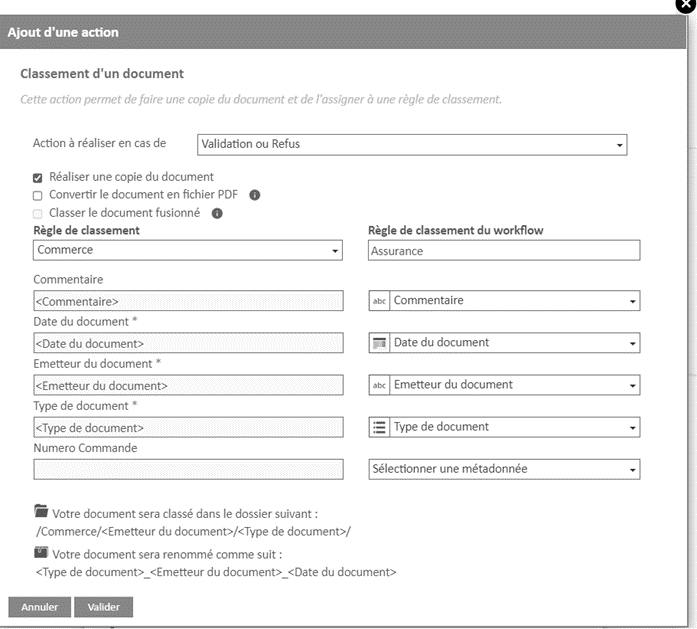
Workflow: Reclassifying a Document
The action of filing a document when validating a workflow task is evolving. Two new options now allow you to:
- Convert the document to PDF before reclassifying
- Choose whether you want to reclassify a copy or the document being processed
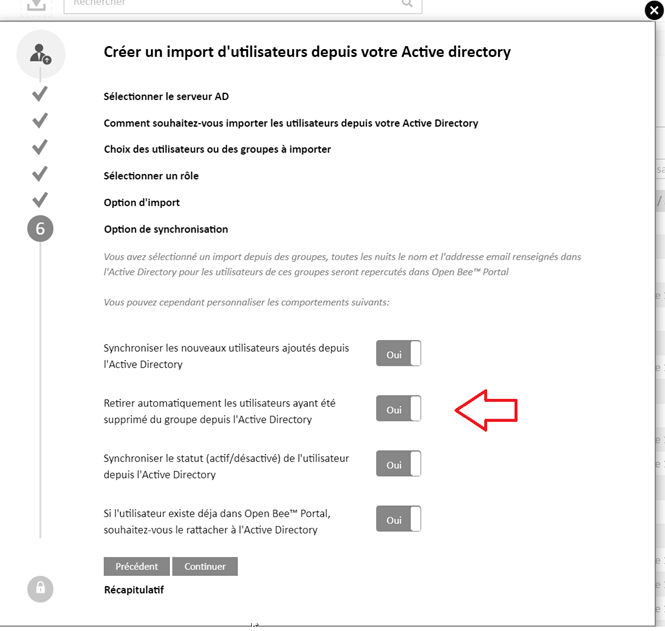
Azure AD / LDAP: Daily group synchronization
A new option now allows you to choose whether you want the removal of a user from a group from the AD to also be applied to Open Bee Portal as a result of the daily synchronization
Azure AD / LDAP: Groups associated with an AD are editable
Groups associated with an Active Directory can be modified from the Open Bee Portal administration.
Thus, it is possible to add users who are not associated with the AD to these groups.
Caution : Daily synchronization may remove users if this configuration is enabled. Only users associated with the AD are affected.
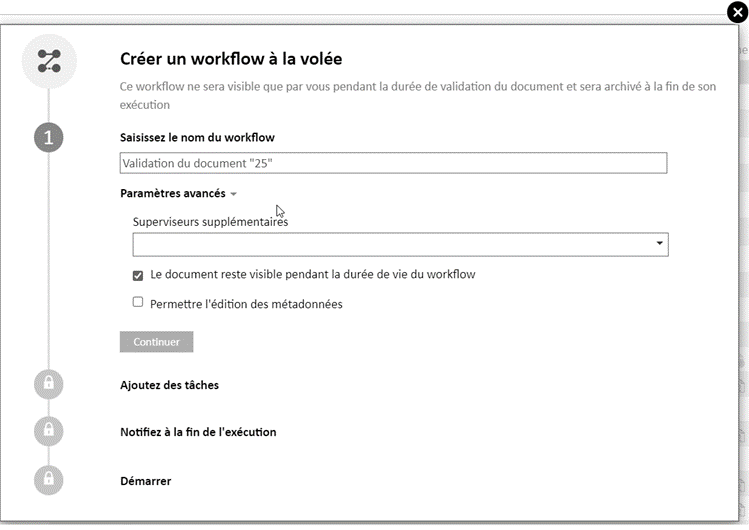
On-the-fly workflow: added the option “Allow metadata editing”
A new option in the advanced settings of an on-the-fly workflow allows the user who is processing the task to edit metadata even if they can’t do so outside of task processing.
Until now, this option only existed in automatic workflows.
Extranet: Shared folder
Frozen users are automatically excluded from the Extranet shared folder.
This eliminates the need to manually exclude each frozen user if you want to continue dropping documents into the shared folder.
v6.14.0
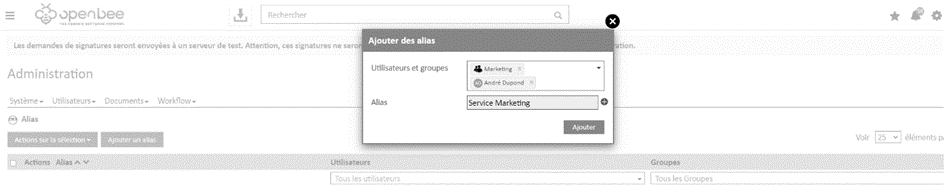
Aliases: Associate multiple users and groups
It is now possible to associate multiple users and/or groups with the same Alias value.
This new feature can be used when setting up workflows.
Malfunction fixes
v 6.14.7
 Updated
- In some cases, the update did not perform correctly and caused errors when using Open Bee Portal
v 6.14.6
Documents
- When editing metadata, the value of the sublist metadata is not correct and takes the value of the list
- The display of sublist values does not follow the same display as list values
Filing of documents
- Unable to add a value to a sublist when ordering or editing document metadata
LDAP/Azure AD
- Unable to import a group that contains more than 100 users
Workflow
- Automatically editing list metadata from a workflow task displayed a value of “new”
- Duplicating rows in a table on a form when validating a task that contains a “Fill in Metadata” action that asks you to fill in the rows in that table.
- If a stopped workflow contains a task with automatic processing, when processing at night, it caused errors
- Unable to position a custom email template template if the metadata is not user and group.
- Slowness in displaying tasks on a document
Emails
- When re-sending an email in error, the attachment was not taken into account
List
- When adding an item to a list, a space before a dash (-) is not displayed
Links
- On the link history screen, an inconsistency on the return of items when filtering on metadata has been fixed
- Sometimes links were duplicated in the case of automatic linking
Sharing
- Pagination error in share list
- It was impossible to create a share via metadata from a non-editable form
- Duplicating transactions during automatic sharing based on the number of versions
- Sending multiple shares if the configuration contains more than one criterion
SQL API
- Filling out a list in a form was not done if the form contains multiple parameterized queries
License
- It was possible to have more users than the license allows
Ranking Rule
- Sometimes, when re-applying a ranking rule, an error message would be displayed
Customization Administration
- Unable to save customization
Other
- Slowdowns on the cloud have been detected when running purge queries
- When adding a document via WebDAV, the extension was doubled
v6.14.5
Sharing
- After a clean installation, it was not possible to access the auto-share screen
- If the share automatically contained two or more filters on metadata, the sharing email was sent multiple times
v6.14.4
Documents
- Unable to display the document tree on the left when a subfolder name contains the “line break” character
- Inconsistent search result after changing a value in metadata if the metadata is used in the naming rule and the “reapply the ranking rule…” is also enabled.
Ranking
- More precise message content if the classification rule cannot be reapplied to a document
- The names of documents added to the “filing area” that contain a period in their name are truncated after this character.
- Unable to add a version to a document if the system metadata “DocumentName” is used in the document naming
- At the collation area level, the “New Value” entry is displayed as a duplicate in a sublist
- At the filing area level, it was not possible to add a version to a document if it is awaiting validation in a workflow.
Users
- Unable to filter and search for a frozen user in the user management interface or in the screen to administer the files of an Extranet.
LDAP / Azure AD
- Daily synchronization did not deactivate the Open Bee Portal user when the user is disabled from LDAP with the “Password never expires” option enabled.
- Improved retrieval of the list of users from an LDAP. The list of users could be left blank depending on the configuration of some Active Directory.
Workflow
- Unable to configure a condition on sublist metadata on a transition between two workflow tasks
- When manually injecting a document into a workflow, the user who filed the document was positioned as the initiator of the workflow instead of the user who performed the manual injection action
- Unable to add a calculated field from a form to the “Trigger Condition” block of a workflow
- Error applying buffer in a Windows environment
- The “Required Entry” parameter was not correctly taken into account in the “Enter Metadata Values” action
Emails
- Error when sending emails if an email template has been modified from the email personalization interface.
- The message entered when creating a simple reminder was truncated in the sent reminder email if it exceeded 50 characters.
History of electronic seals
- File names containing special characters are not correctly displayed in the electronic stamp history screen.
Links
- Duplicate links inserted between two documents when two automatic links are set up and the document is added by Open Bee Smart Capture.
Security
- Updated Apache to version 2.4.57
v6.14.3
Documents
- Document renaming is not done automatically after changing the metadata values from the “Document Properties” section
- Desktop Online Edition: Certificate Renewal for client_obp.exe and MsOfficeConfiguration.exe Executables
- Unable to display some empty folders when automatic bindings are set
- Fixed the display of creation dates in document properties
Ranking Rule
- Unable to display the ranking rules configuration screen if the user list is not loaded properly if a user contains a special character
- Sublists are not created correctly when duplicating a ranking rule
Automatic sharing
- Fixed checking the condition for triggering automatic sharing when changing metadata values on a document. Only the first condition was met
Tasks
- An external user could no longer assign a task or reminder to themselves
Extranet
- Unable to unlink users from the “Batch Assignment and Unlink” feature
Email Personalization
- Decimal metadata is now rounded to the third decimal point
Event Logs
- Unable to apply a filter in the log interface since version 6.14.2 outside of the date filter
Azure AD / LDAP
- Unable to perform a user or group import when there are multiple servers configured on the same instance
Advanced Electronic Seals
- Unable to save seal configuration in a Windows environment
Workflows
- Unable to save a change to a workflow. The message “invalid token” is displayed
Forms
- Incorrect folder names after adding a form response that has multiple metadata used in the document tree
Chorus
- Automatic invoice submission doesn’t work
Performance
- Optimized the display of notifications related to workflows and tasks
v6.14.2
Authentication
- The “:” character is no longer allowed in new passwords in order to avoid authentication errors by API (e.g. mobile application)
Filing of documents
- In the collation area, fixed the display of the document path when the document contains metadata with multiple values
- Takes into account the default value selected in the parent list to display the correct values directly in the dependent sublist.
Documents
- Desktop online editing: fixed a document upload error preventing online editing with Office 365
- As a result of adding new auto-increment metadata to the document name, reapplying the rule to a set of documents assigned the same auto-increment value to those documents
Workflow
- Metadata Value Entry Action: Incorrect display of the contents of a multi-list metadata in the action popup
- Word Data Merge Action: Improved Variable Replacement with Metadata Value
- Task history: The tooltip indicating that a task has been auto-validated is not displayed if the task is assigned to a user group
- Conditional Transition: Unable to enter a decimal value
Newspapers
- Better consideration of time zones when filtering on dates in logs
Active Directory
- Users who were disabled on LDAP were always disabled on Open Bee Portal even if status synchronization was not enabled
Security
- Changing URLs that don’t support the RFC1738
v6.14.1
Documents
- Loss of sublist values after editing a document’s metadata
Ranking Rule
- Unable to delete metadata that has been used as parent metadata
Workflow
- Reclassification action: The sharing email was sent as a duplicate when automatic sharing was configured on the filing rule used by the document reclassification action
- Metadata could not be displayed in the validation screen of a task if the user did not have permissions on the entire document tree
- Automatic task processing stops as soon as a task cannot be validated. Open Bee Portal now continues processing on the following tasks
Alias
- An alias with special characters in the name doesn’t work
Forms
- Automatic links between documents and a form do not work when the form is completed by a user with the Viewer role
SQL Query
- Fixed an encoding issue preventing query execution with Excel databases
Active Directory
- Error updating a user via LDAP that was initially imported without an associated email
- Unable to synchronize user status when an instance has reached the allowed user limit
Performance
- The loading of user and group lists is done only when these lists are opened. This operation is generalized to all interfaces displaying lists of users and groups
- Improved retrieval of users and groups in the LDAP/Azure AD configuration interface
Security
- Updated Apache to version 2.4.54
- MySQL updated to 5.7.41
v6.14.0
Filing of documents
- The application firewall blocks the classification of certain documents by drag & drop
- When a document cannot be automatically classified, it is not possible to create a folder from “digital” metadata if it contains a value of 0
- Fixed a random error when loading Javascript preventing a document from being added from the filing area
Documents
- Asian characters incorrectly displayed in the document tree on the left
- Unable to add a value to a sublist that has been unlinked from its parent list
- Editing a classification rule is no longer prohibited if the metadata you are seeking to remove is not directly used in a workflow
Research
- Fixed the selection of a “users and group” filter in the advanced search screen
Users
- The password change page is no longer displayed at login when the user is associated with an Active Directory server
- The password change page is no longer displayed at login when the administrator disables the password renewal policy
- Explicit error message is displayed when Google Chrome’s “autocomplete” mistakenly fills in the password field and prevents the user from being created
Email Personalization
- Unable to duplicate and modify the content of an email following an update of the ckEditor library
Workflow
- Filing a document still triggers workflows that have the “Don’t trigger workflow when the document is added” option enabled
- Unable to save the “force alias” option on a workflow task
SQL Queries Workflow
- Lists retrieved by SQL query incorrectly display when query is displayed in a table (Form)
- Unable to use the Gateway due to a change in security policy that makes the JWT token generated to execute SQL queries in the cloud incompatible
- Metadata-dependent SQL queries that are automatically populated when the form response screen is displayed are now executed.
History of electronic seals
- Unable to apply 2 filters at the same time (e.g. document name and status)
Event Log
- Tracing attempts to view documents that failed due to missing permissions in the log
Other
- Improved removal of large dumps older than 30 days on a Windows environment
- Added a control prohibiting the configuration of session durations equal to 0 hours in the general application configuration