Known symptoms:
- After an update, the client cannot connect to browsers (Firefox and Chrome), it is redirected directly to the login page.
- However, it is possible to connect via IE or EDGE.
To resolve this issue, please follow these steps:
Step One
Navigate to the sfWebController.class.php file under the following directory: openbeeportallibvendorsymfony1.5libcontroller
Step Two
- Open the file with Notepad++
- Go to Redirect() function
- Change the code below on line 199:
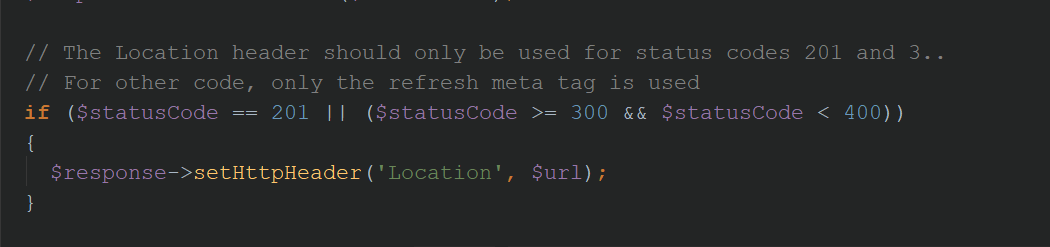
with the following code:
if(($statusCode >= 300 && $statusCode < 400)){
 // OBP-7063 ajouter les cookies dans la navigateur avec php natif
 foreach ($response->getCookies() as $cookie){
 setcookie($cookie['name'], $cookie['value'], $cookie['expire']);
 }
 header('Location: '.$url);
 exit();
}
// The Location header should only be used for status codes 201 and 3..
// For other code, only the refresh meta tag is used
if ($statusCode == 201)
{
 $response->setHttpHeader('Location', $url);
}
Then Save your changes to the file.
Step Three
Check that you have CLEAR CACHE
Refresh the Portal page in the browser and log in.