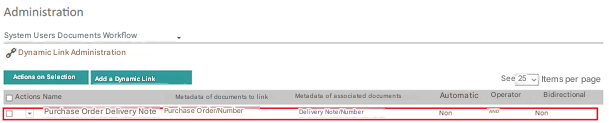
To Add a Dynamic Link
- Go to the administration area and then to the Dynamic Links Administration
- Select “Add Dynamic Binding”

Dynamic Linking
One-way dynamic linking (not automatic)
- Add a packing slip document with the metadata “Number ” equal to 101
- Add a PO document with the metadata “Number ” equal to 101
- The order in which documents are added is not important.
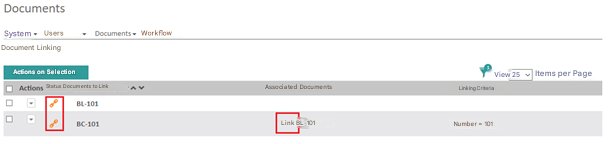
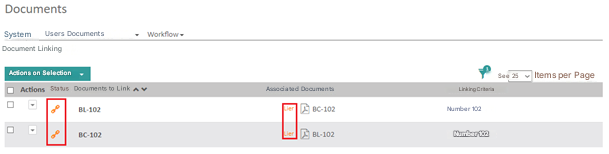
Since the link is dynamic one-way, you won’t have linked documents, you will have suggested documents (suggestion in orange). You will also have the option to link these documents.
Bi-directional dynamic linking (non-automatic)
- Add a packing slip document with the metadata “Number ” equal to 102
- Add a Purchase Order document with the metadata “Number ” equal to 102
- The order in which documents are added is not important.
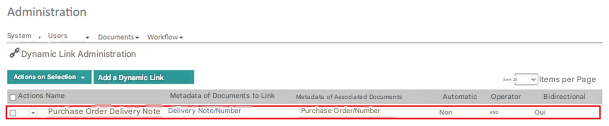
Because the binding is dynamic and bidirectional, you’re going to have two documents and two suggested documents. You will also have the option to link these two documents using the Link button.
Automatic Dynamic Linking
One-way automatic dynamic linking
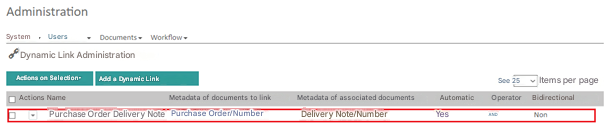
The fact that the link is automatic, i.e. the linking process starts automatically when a document of the Document to be linked type is added or modified.
For one-way
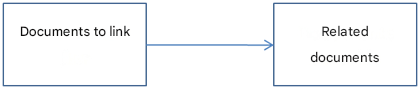
automatic dynamic linking, you must first add the documents to be linked, and then the documents to be linked.
For example :
- Add a packing slip document with the metadata “Number ” equal to 100
- Add a Purchase Order document with the metadata “Number ” equal to 100
To view the bindings, go to the main menu and select “Bindings ”

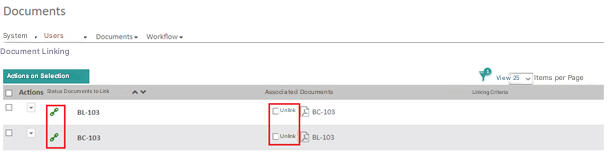
The two documents are linked (link in green) and this link was done automatically. You also have the option to unlink these documents by checking the “Unlink ” box
Two-way automatic dynamic linking
- Add a Purchase Order document with the metadata “Number ” equal to 103
- Add a packing slip document with the metadata “Number ” equal to 103
- The order in which documents are added is not important.
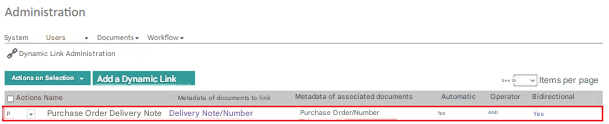
Because the link is dynamic, automatic and bidirectional, you’re going to have two documents linked to each other. You will also have the option to unlink these two documents by checking the unlink box.