The dashboard displays the list of widgets that are currently configured for you.
Widgets provide a variety of features for viewing data and accessing other screens.
The operation and configuration of each widget is detailed in the widget-specific section.
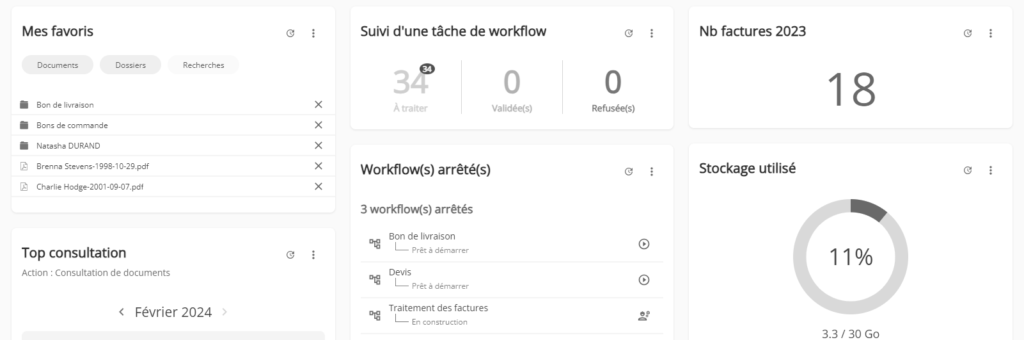
Each widget has two buttons:
- The button
 allows you to refresh the widget data (see “Data refresh” section)
 - Le bouton
 affiche jusqu’à deux actions supplémentaires :
- The “Edit” button allows you to change the configuration of the widget (if applicable).
- The “Delete” button allows you to remove the widget from the dashboard.
List of available widgets
The library of available widgets includes the following widgets:
- Administration – User Accounts : Displays the status of the user license for the chosen user type (User, External, View).
- Administration – Items in the Trash : Displays the number of items waiting to be deleted in the Trash.
- Administration – Statistics of the use of an action: Displays, over the last 4 months, the 3 users who have performed the chosen action the most times.
- Administration – Storage Used : Displays the status of the storage on your document space.
- Document – Adding Documents : Allows you to add documents to your filing area.
- Document – Recent Documents : Allows you to access documents that you have recently viewed.
- Document – My Favorites : Gives you access to your favorite documents, folders, and searches.
- Extranet – Inactive Users : Displays the number of external users who have not viewed new documents over a period of time, for the specified extranet.
- My Notifications : Allows you to view your notifications for the chosen notification categories.
- Sharing – Number of documents shared automatically : Displays the number of documents shared automatically over a period of time, for the specified automatic sharing.
- Search – Number of search results : Displays the number of documents matching the specified search.
- Search – Recent Searches : Allows you to access searches that you have recently performed.
- Search – Classification rule usage statistics : Displays the number of documents created each month over the last 12 months for the specified classification rule.
- Workflow – Documents Committed in a Workflow : Displays the number of documents released each month over the last 6 months for the specified workflow.
- Workflow – Workflow Task Tracking : Displays the number of tasks that were approved, declined, or processed over a period of time, for the specified workflow and task.
- Workflow – Tasks to Process : Displays the number of tasks to be processed for the specified quick filter.
- Workflow – Stopped Workflow(s ): Displays workflows that have been stopped or are under construction, and allows you to start them.
Data Refresh
In order to improve the display performance of the dashboard, the data displayed is
updated every 30 minutes.
The data can also be manually updated at any time in two ways:
- Using the “Refresh” button in the banner: the data of all the widgets of the dashboard is then updated.
- Using the button on each widget: only the data of the relevant widget is then updated. The date the data was last refreshed is displayed when you hover over the button.