Summary
Introduction
Starting with version 7.3.0, Open Bee™ Portal uses a new search engine: OpenSearch.
Open Bee™ Portal cannot work without this new engine, so installation requires the following:
- Installing Open Bee™ Portal
- Installing OpenSearch
OpenSearch installation must be done after installing Open Bee™ Portal
Open Bee™ Portal Installation
A local Windows administrator account is required for installation.
From Windows Explorer, run the installer with a local Administrator account.

The program offers to install the necessary files on the hard drive.
Click ” Next ” and wait for the installation to be complete.
The Open Bee™ Portal installer will also proceed with the installation of a MySQL database and various must-have components such as PHP and Apache.
Port detection and parameterization in Windows:
Detect the availability of ports 8443, 8000 (Apache), and 3306 (MySQL) during installation and the ability to
Change these ports if they are already used by other services.
 Since version 6.3, Open Bee™ Portal has ERLANG on board, which may cause the following alert:
Failure to open the firewall will have no impact on the operation of the product.
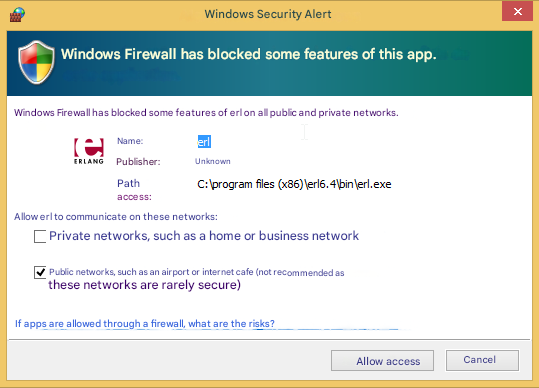
Once the installation is complete, a page will automatically appear in your internet browser so that you can activate your software.
Installation Open Search
L’installation d’OpenSearch se fait via un exécutable dédié : OpenSearchTools_Setup.exe.
OpenSearchTools_Setup.exe performs the following operations:
- Installing OpenSearch
- Creating a Windows service named OpenSearch
- Starting OpenSearch
- Installing the utilities needed for data migration
Installing the three OpenSearch utilities
Three utilities are installed automatically, in the form of desktop shortcuts:
- Migration OpenSearch
- OpenSearch synchronization
- OpenSearch Diagnostics
The Synchronization utility is not useful for a clean installation. It is only to be used in the event of an update (see update section).
Step 1 — Install OpenSearch and Utilities
- Run OpenSearchTools_Setup.exe.
- Once the installation is complete:
- Verify that the OpenSearch service is installed and started.
- Verify that the configured port (default 9200) is reachable.
- Verify that all three utilities (Diagnotic OpenSearch, OpenSearch Migration, and OpenSearch Synchronization) are accessible from the desktop
- Run the OpenSearch Diagnostic utility to validate the installation and accessibility of OpenSearch.
If the diagnostic returns installation errors on the Python modules, these will be automatically downloaded when the migration is executed.
/!\ Attention: OpenSearch should not be installed on the same machine as Open Bee™ Scan OCS. On the other hand, OpenSearch can be installed on the same machine as Open Bee™ Portal.
Specific case: Python is already installed on the machine
In the event that Python is already installed on the machine intended to host Open Search, two scenarios are possible:
- The installed version of Python is lower than version 3.7:
- You need to uninstall Python from the machine
- The installed version of Python is greater than or equal to version 3.7
- When installing OpenSearch, you must uncheck “Python Installation” at the step of choosing which components to install
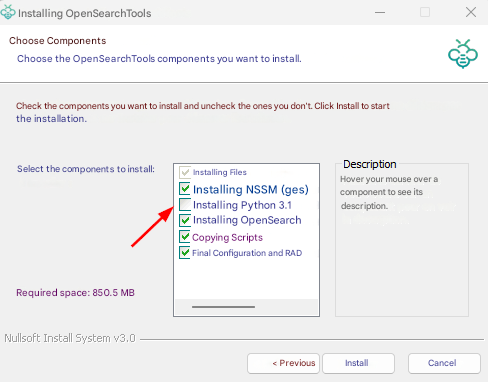
Step 2 — Initiate data migration
- Run OpenSearch migration.
- Wait for the migration to complete completion.
- Check for errors in PO line returns and associated logs.
Note: This can be done while Open Bee™ Portal is in use.
Specific case: OpenSearch is not installed on the same server as Open Bee™ Portal
In the event that OpenSearch and Open Bee™ Portal are installed on different servers, the utility’s automatic connection attempt will fail:
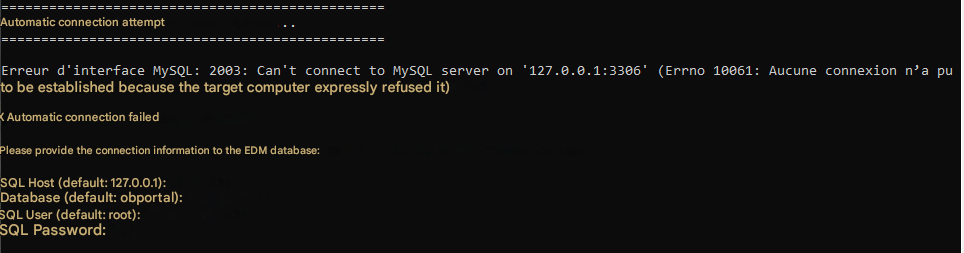
In this case, you must specify the Open Bee™ Portal database connection information before continuing with the migration.
It is possible that this will result in a MySQL error 1130 during migration. By default, the root user cannot connect to the Open Bee™ Portal MySQL server from a remote server.
It is necessary to add this privilege to this user, by running the following command on the relevant MySQL server:
GRANT ALL PRIVILEGES ON *.* TO ‘root’@’%’ IDENTIFIED BY ‘openbee74’;
FLUSH PRIVILEGES;