Symptoms
In a Windows environment, the following services are paused (they start but automatically pause)
- openbeeportal AMQP High Priority Queue
- openbeeportal AMQP Low Priority Queue
In a Windows console, from the “Utilityrabbitmqrabbitmq_server-3.5.3sbin” subfolder of the installation folder, the rabbitmqctl list_queues command returns the following errors:
>rabbitmqctl list_queues
rabbit@OPENBEE-PC:
* connected to epmd (port 4369) on OPENBEE-PC
* EPMD Reports Node ‘Rabbit’ Running on Port 25672
* TCP connection succeeded but Erlang distribution failed
* Suggestion: HostName Mismatch?
* suggestion: is the cookie set correctly?
* suggestion: is the Erlang distribution using TLS?
Current Node Details:
– Node name: ‘rabbitmq-cli-42768@philippe-pc’
– home dir: C:UsersPaul AndrÚ
– cookie hash: QgrxoJ+J5eaDhn7uQE47LA==
Impacted versions
Open Bee™ Portal version 6.x. randomly on certain installations
Resolution
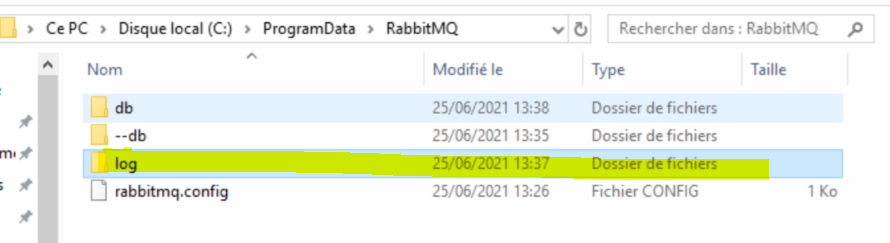
Clear Rabbitmq’s log folder
Recommendation
Always run the commands for this item as follows:
– In a console as an admin
– From the C:Program Files (x86)OpenBeeOpenBeePortal5Utilityrabbitmqrabbitmq_server-3.5.3sbin folder (to be adapted according to the installation path) for windows
- Copy the .erlang.cookie file manually from %SystemRoot% to %HOMEDRIVE%%HOMEPATH%
- Restart the openbeeportalRabbitMQ service
- Check if the user “openbee” exists with the command “rabbitmqctl list_users”:
rabbitmqctl list_users
If “openbee” does not exist, create it by running the following commands:
rabbitmqctl.bat add_user openbee Openbee74
rabbitmqctl.bat set_permissions -p / openbee “.*” “.*” “.*”
rabbitmqctl.bat delete_user guest
- Restart the openbeeportalRabbitMQ service
- Restart the AMQP low and high priority services “openbeeportal AMQP High Priority Queue” and “openbeeportal AMQP Low Priority Queue”.
- Relaunch the diagnostic tool