User Interface Language
By default, Open Bee™ Portal detects the language of the web browser and displays the web interface in that language. The language used for the display can be changed at any time from the menu.
Careful: the language of the browser’s user interface is not necessarily the language that the browser will indicate to Open Bee™ Portal.
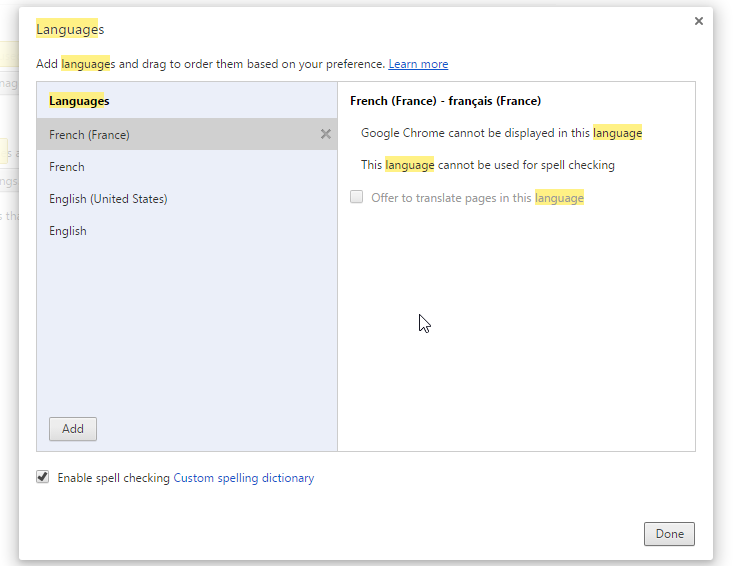
For example, in the screen below, Google Chrome uses English as the display language, but it will indicate the language “French” to Open Bee™ Portal because it is the first in the list in the configuration. Open Bee™ Portal will therefore be displayed in French by default.
Language of email notifications
The language used to send emails to a user is unique to each user.
By default, when a user is created, the language of the overall installation configuration is assigned to the user. This language is either chosen by the installer during a Windows installation, or is automatically determined by the language of the operating system on a Debian installation.
Each time a user logs in to the Open Bee™ Portal web interface with a different language than the one assigned to them, it is updated.
Example
: The language chosen by the Open Bee™ Portal installer is English. When a user is created, they will receive an account creation notification in English.
If the user then logs in using French in their browser, their language will be changed to English. If they receive an email notification, it will be in French.
Changing the global language at installation
In the installation folder:
- Open the settings.yml file with a UTF-8 compatible text editor
- Change the “default_culture” parameter
- To save
- Clear Open Bee™ Portal cache